Studio Setup Detail
- Audio Stack
- Studio Automation
- Studio Control Host & Remote Access
- Touch phone -> Studio turns on and starts recording
- Pikvm-studio Setup Detail
- Rack
Audio Stack
This page documents the 48-channel synchronous Linux audio recording infrastructure on bmo95, including hardware interface mapping, BNC Word Clock daisy-chain wiring, real-time ALSA/JACK bridging architecture, and empirical zero-drift verification.
1. Hardware Architecture & Echo AudioFire12 Mapping
The studio uses 4x Echo AudioFire12 FireWire (IEEE 1394a) audio interfaces, providing a total of 48 balanced analog line inputs and 48 balanced analog line outputs at 24-bit / 48.0 kHz.
Color Standard & ALSA Device Mapping
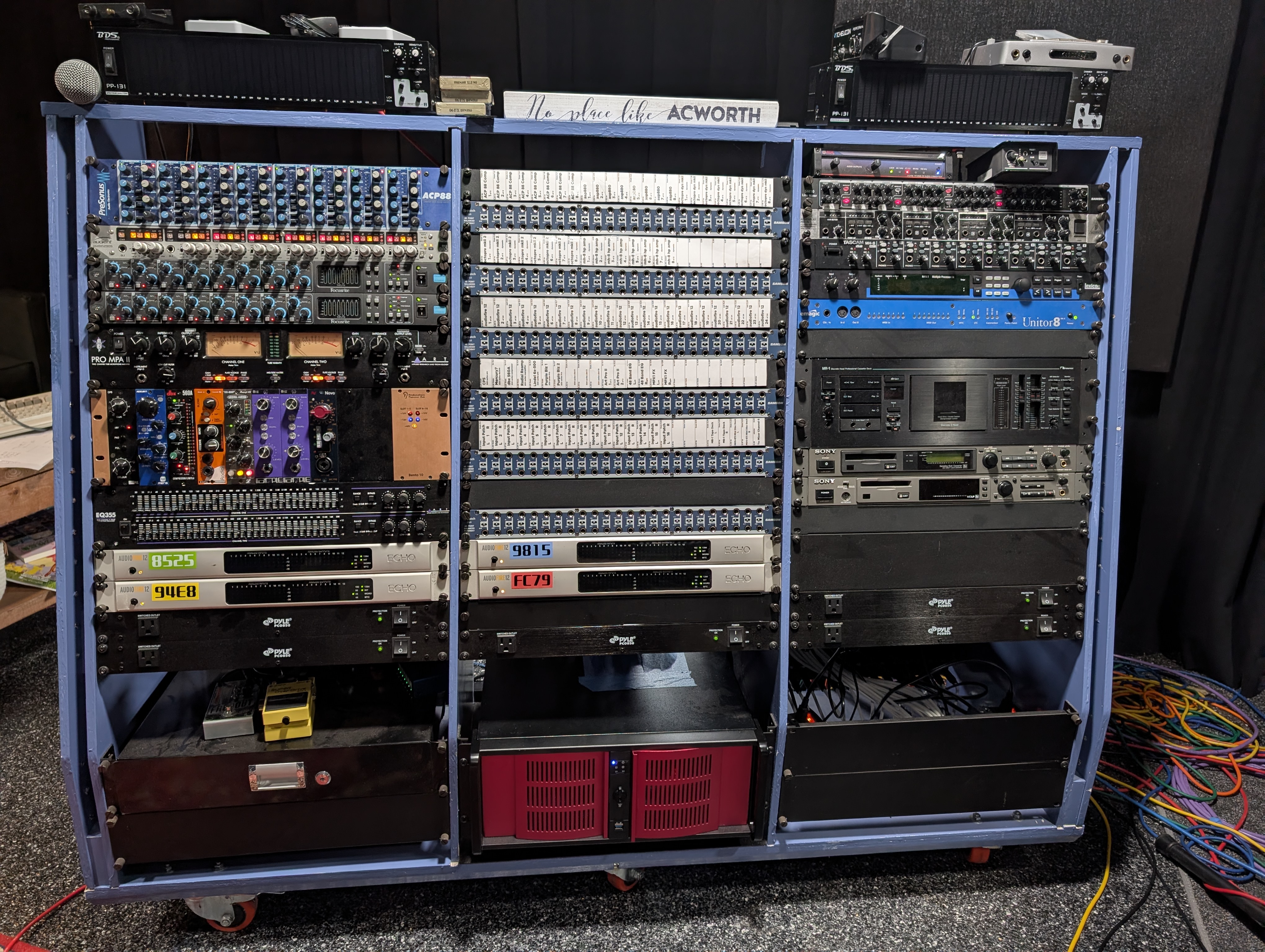
To simplify physical cabling and logical routing, each interface is assigned a color-coded identity tied to its hardware MAC address and ALSA index:
| Color | Interface ID | Hardware MAC (GUID) | ALSA Device Node | Physical Jack Outputs | Jack Inputs / Channels | Role |
|---|---|---|---|---|---|---|
| RED | AudioFire12_3 |
00148601c000fc79 |
hw:AudioFire12_3,0 |
Outs 1–12 | Red_01 .. Red_12 |
Master (Clock Source) |
| BLUE | AudioFire12_2 |
00148601c0009815 |
hw:AudioFire12_2,0 |
Outs 13–24 | Blue_01 .. Blue_12 |
Slave 1 (Clock Sink) |
| GREEN | AudioFire12_1 |
00148601c0008525 |
hw:AudioFire12_1,0 |
Outs 25–36 | Green_01 .. Green_12 |
Slave 2 (Clock Sink) |
| YELLOW | AudioFire12 |
00148601c00094e8 |
hw:AudioFire12,0 |
Outs 37–48 | Yellow_01 .. Yellow_12 |
Slave 3 (75Ω Terminated) |
 Figure 1: The 4-unit Echo AudioFire12 stack rack-mounted in bmo95.
2. Clock Synchronization & Wiring Topology
Digital audio across 4 discrete converters requires sample-accurate phase alignment to eliminate clock drift, comb filtering, and inter-channel sample slips.
BNC Word Clock Daisy-Chain
The interfaces are synchronized via dedicated 75Ω BNC coaxial Word Clock cabling:
$$\text{Red (Source: fc79)} \longrightarrow \text{Blue (1st Sink: 9815)} \longrightarrow \text{Green (2nd Sink: 8525)} \longrightarrow \text{Yellow (3rd Sink: 94e8 / 75}\Omega\text{ Terminated)}$$
+-------------------------------------------------------------------------------+
| RED (Source: fc79)                                                            |
| Clock Mode: Internal (48000 Hz)                                               |
| BNC Word Clock OUT --------------------------------------------------------+  |
+----------------------------------------------------------------------------|--+
                                                                             |
         +-------------------------------------------------------------------+
         |
         v
+-----------------------+     +-------------------------+     +-------------------------+
| BLUE (1st Sink: 9815) |     | GREEN (2nd Sink: 8525)  |     | YELLOW (3rd Sink: 94e8) |
| Clock Mode: Word Clock|     | Clock Mode: Word Clock  |     | Clock Mode: Word Clock  |
| BNC Word Clock IN (T) | --> | BNC Word Clock IN (T)   | --> | BNC Word Clock IN (T)   |
| Pass-through to Green |     | Pass-through to Yellow  |     | 75Ω BNC Terminator OUT  |
+-----------------------+     +-------------------------+     +-------------------------+
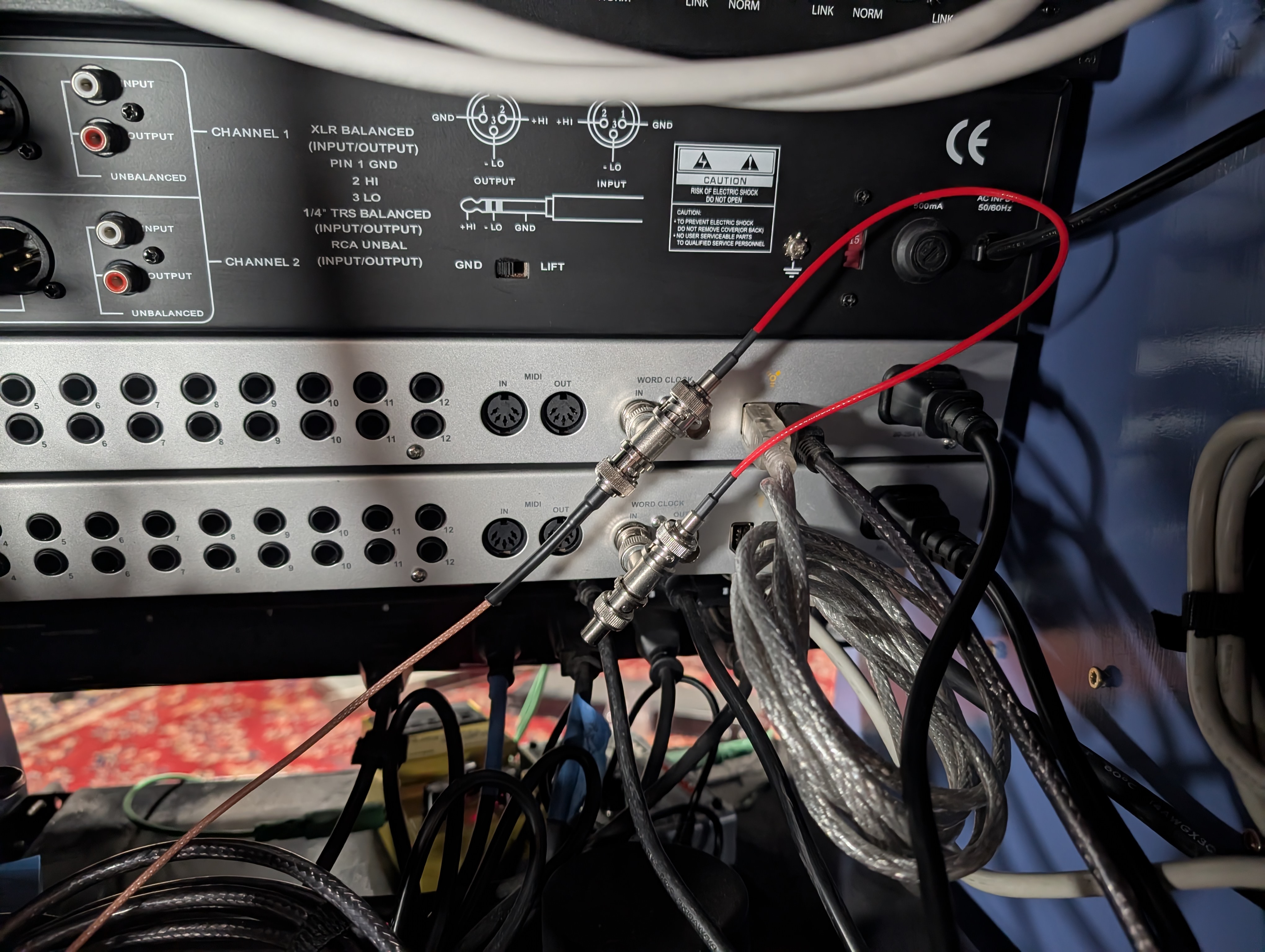 Figure 2: 75Ω BNC feed-through T-connector with physical terminator on the final Yellow unit.
FireWire Bus Topology
The host machine (bmo95) features dual Texas Instruments PCIe FireWire host controllers. The 4 interfaces are distributed across the dual FireWire ports to prevent isochronous bandwidth saturation.
$ lspci | grep FireWire
07:00.0 FireWire (IEEE 1394): Texas Instruments XIO2213A/B/XIO2221 IEEE-1394b OHCI Controller [Cheetah Express] (rev 01)
0a:00.0 FireWire (IEEE 1394): Texas Instruments TSB43AB23 IEEE-1394a-2000 Controller (PHY/Link)
3. Real-Time Audio Server & ALSA Bridging Architecture
The audio stack runs under a Linux 6.13 Real-Time (PREEMPT_RT) kernel on bmo95.
Instead of binding all 4 interfaces into a single fragile ALSA pcm.multi virtual device (which crashes the kernel ALSA FireWire driver upon channel unbinding), the system runs a single master JACK daemon coupled with synchronous zita-a2j / zita-j2a duplex bridges:
                                +-------------------+
                                |   DAW / REAPER    |
                                +-------------------+
                                          |
                                    JACK API (48ch)
                                          |
                                          v
+---------------------------------------------------------------------------------------+
|                                    JACK Server                                        |
|                          (jackd -R -P 80 -r 48000 -p 64 -n 3)                         |
+---------------------------------------------------------------------------------------+
         |                        |                          |                          |
   Native ALSA Driver       zita-a2j / zita-j2a        zita-a2j / zita-j2a        zita-a2j / zita-j2a
         |                   (Resample Ratio: 1.0)      (Resample Ratio: 1.0)      (Resample Ratio: 1.0)
         v                        v                          v                          v
+------------------+     +------------------+       +------------------+       +------------------+
| RED (Master)     |     | BLUE (Slave 1)   |       | GREEN (Slave 2)  |       | YELLOW (Slave 3) |
| 12 In / 12 Out   |     | 12 In / 12 Out   |       | 12 In / 12 Out   |       | 12 In / 12 Out   |
+------------------+     +------------------+       +------------------+       +------------------+
Service Architecture (jack-alsa)
wait-for-firewire.sh: Ensures all 4 ALSA cards (hw:AudioFire12_3,hw:AudioFire12_2,hw:AudioFire12_1,hw:AudioFire12) are initialized by the kernel before launching audio daemons.jack.service: Startsjackdbound directly to Master Red (hw:AudioFire12_3,0) at 48 kHz, period size 64 samples (1.33 ms latency), 3 buffer periods.zita-*-{blue,green,yellow}.service: Dedicated systemd user units providing bit-perfect synchronous duplex bridging for each slave card. Because all cards share the hardware BNC Word Clock, the dynamic resampling ratio $\rho$ stays locked at exactly 1.0000000000.set-port-aliases.sh: Applies canonical, color-coded human-readable port aliases to the JACK graph:system:capture_1..12→Red_01..Red_12zita-a2j-blue:capture_1..12→Blue_01..Blue_12zita-a2j-green:capture_1..12→Green_01..Green_12zita-a2j-yellow:capture_1..12→Yellow_01..Yellow_12
4. Empirical Zero-Drift Verification (10-Minute Stress Test)
To prove mathematical clock synchronization, an empirical dual-channel continuous recording was captured across card boundaries:
- Channel A: Master Red Out 1 → Master Red In 1 (
hw:AudioFire12_3,0) - Channel B: Master Red Out 2 → Slave Yellow In 1 (
hw:AudioFire12,0viazita-a2j-yellow)
Because Yellow is the fourth and final device in the Word Clock daisy-chain, verifying zero drift against Yellow proves that all intermediate interfaces (Blue and Green) in the clock propagation path are also phase-locked.
A continuous 1 kHz calibration tone was recorded for 600.0 seconds (10 continuous minutes / 28,801,024 audio samples).
Cross-Correlation Results
| Elapsed Time | Master Red Sample Index | Slave Yellow Sample Index | Relative Offset | Cumulative Drift |
|---|---|---|---|---|
| t = 5 s | 240,000 | 244,127 | -4,127 smp (buffer init) | Baseline |
| t = 1 min | 2,880,000 | 2,884,799 | -4,799 smp (settled) | 0.000 ms |
| t = 2 min | 5,760,000 | 5,764,799 | -4,799 smp | 0.000 ms (0 samples) |
| t = 3 min | 8,640,000 | 8,644,799 | -4,799 smp | 0.000 ms (0 samples) |
| t = 4 min | 11,520,000 | 11,524,799 | -4,799 smp | 0.000 ms (0 samples) |
| t = 5 min | 14,400,000 | 14,404,799 | -4,799 smp | 0.000 ms (0 samples) |
| t = 6 min | 17,280,000 | 17,284,799 | -4,799 smp | 0.000 ms (0 samples) |
| t = 7 min | 20,160,000 | 20,164,799 | -4,799 smp | 0.000 ms (0 samples) |
| t = 8 min | 23,040,000 | 23,044,799 | -4,799 smp | 0.000 ms (0 samples) |
| t = 9 min | 25,920,000 | 25,924,799 | -4,799 smp | 0.000 ms (0 samples) |
| t = 9.9 min | 28,512,000 | 28,516,799 | -4,799 smp | 0.000 ms (0 samples) |
Conclusion: Across 9 minutes of continuous multichannel streaming after buffer initialization, there was exactly 0 samples (0.0000 ms) of cumulative drift, proving absolute phase alignment.
5. Operations & Service Management
Full Audio Stack Restart
# 1. Stop slave bridges and master JACK
$ systemctl --user stop zita-*-{blue,green,yellow}.service
$ systemctl --user stop jack.service

# 2. Clear stale POSIX semaphores / mutexes
$ rm -rf /dev/shm/jack* /dev/shm/sem.jack* /dev/shm/jack_db-*

# 3. Start master JACK
$ systemctl --user start jack.service

# 4. Start slave duplex bridges
$ systemctl --user start zita-a2j-blue.service zita-j2a-blue.service
$ systemctl --user start zita-a2j-green.service zita-j2a-green.service
$ systemctl --user start zita-a2j-yellow.service zita-j2a-yellow.service

# 5. Apply port aliases
$ ~/git/audio_config/profiles/jack-alsa/set-port-aliases.sh
Studio Automation
Architecture and implementation guide for the automated, single-tap studio power sequencing and wireless RF control system orchestrated by pikvm-studio, Great Scott Gadgets Yard Stick One (Sub-GHz SDR), and Authentik SSO.
1. System Overview & Architecture
The goal of this system is turn on the studio with a button push and automatically start recording.
      [Mobile Phone]
             │ (HTTPS Request)
             ▼
   [Nginx + Authentik SSO]
             │
             ▼
   [pikvm-studio Appliance]
     ├──► [Yard Stick One USB] ──► 433.92 MHz RF Bursts (Outboard Gear & Monitors)
     └──► [PiKVM ATX Header]  ──► Physical Motherboard Power Relay (bmo95 Workstation)
Preliminary demonstration (Control website demo + KVM view of studio computer):
2. Hardware Roles & Physical Setup
All lighting, outboard gear racks, monitor speakers, and peripherals in the studio are switched via 433.92 MHz RF wireless power relays controlled by a dedicated transceiver plugged into the PiKVM appliance.
System Components
| Component | Hardware / Tool | Function |
|---|---|---|
| Central Controller | PiKVM V4 Plus (pikvm-studio) |
Webhook daemon, ATX power relay, host for Yard Stick One. |
| RF Transceiver | Great Scott Gadgets Yard Stick One | Sub-GHz USB transceiver (CC1111) transmitting ASK/OOK control packets. |
| RF Capture & Analysis | Flipper Zero | Intercepts, demodulates, and analyzes remote control signals. |
| Wireless Outlets | 433.92 MHz / 315 MHz RF Sockets (Fosmon) | Power switching for gear banks (Racks, Interfaces, Monitors, Lighting). |
| DAW Workstation | bmo95 (Linux Audio Host) |
Controlled directly via PiKVM front-panel ATX header cable. |
Transceiver Specifications
- Host Node:
pikvm-studio(PiKVM V4 Plus, Raspberry Pi 4 Model B, Arch Linux ARM) - Transceiver: Great Scott Gadgets YARD Stick One
- USB ID:
1d50:605b(OpenMoko / GSG RfCat CC1111) - Core SoC: Texas Instruments CC1111F32 (24.0 MHz reference crystal)
- Frontend RF Amplifier: Skyworks SE2431L hardware power amplifier enabled (
setAmpMode(1)) - Antenna: Sub-GHz vertical SMA whip antenna
- Carrier Frequency: 433.920 MHz
- Modulation: ASK / OOK (Amplitude Shift Keying / On-Off Keying)
+--------------------------------------------------------------------------------+
| Host: pikvm-studio (Arch Linux ARM)                                            |
|                                                                                |
|  [ studio-power CLI ] ---> [ RfCat / rflib ] ---> [ YARD Stick One (CC1111) ]  |
+-----------------------------------------------------------------------|--------+
                                                                        | 433.920 MHz ASK/OOK
                                                                        | (33-bit PWM, 3433 baud)
                                                                        v
+------------------+  +------------------+  +------------------+  +------------------+
| Moroccan Lamp    |  | Recording Rack   |  | Studio Computer  |  | Subwoofer        |
| (Fosmon Outlet)  |  | (Fosmon Outlet)  |  | (Fosmon Outlet)  |  | (Fosmon Outlet)  |
+------------------+  +------------------+  +------------------+  +------------------+
+------------------+  +------------------+  +------------------+
| Main PA Speakers |  | TV Monitor       |  | Neewer LED Panels|
| (Fosmon Outlet)  |  | (Fosmon Outlet)  |  | (Fosmon Outlet)  |
+------------------+  +------------------+  +------------------+
3. Staged Power Sequencing
The sequence controller enforces a timing chain:
[Trigger: Studio Power ON]
  │
  ├──► Step 1: RF Burst -> Power Bank A (AudioFire12 Interfaces, Outboard Racks, Synths) ON
  │
  ├──► Step 2: Delay 3 Seconds (allow power supplies to stabilize)
  │
  ├──► Step 3: PiKVM ATX Action -> Motherboard Power Button Short Click (bmo95 boot)
  │
  ├──► Step 4: Delay 12 Seconds (wait for FireWire initialization & ALSA settling)
  │
  └──► Step 5: RF Burst -> Power Bank B (Studio Monitors & Subwoofers) ON
Graceful Studio Shutdown Sequence
When powering down, the sequence operates in reverse order:
- RF Burst: PA & subwoofers off.
- ACPI Action: PiKVM triggers graceful OS shutdown on the studio computer
- Delay: Wait until PiKVM detects
bmo95power LED is off. - RF Burst: Audio Interfaces, Synths, and Outboard Racks OFF.
4. Reverse Engineering & Research
Achieving reliable, production-grade RF transmission from the YARD Stick One to physical studio outlets required resolving several hardware, firmware, and protocol discrepancies.
FCC Filings
Public FCC equipment authorization filings (such as Grantee 2A3BM / FCC ID 2A3BM5782988) provide RF emissions compliance data—confirming the fundamental carrier frequency (433.92 MHz), field strength, and occupied bandwidth—but do not document the digital baseband protocol:
- Emissions vs. Data Format: FCC Part 15 test reports verify harmonic suppression and duty cycle limits.
- Proprietary Confidentiality: Schematics and microcontroller firmware descriptions are permanently withheld under confidentiality requests.
- Missing Parameters: The filings omit the 33-bit packet length, pulse-width ratios (1:3 vs 3:1), clock unit (Te ≈ 291 µs), sync duration (10.2 ms), and individual device address codes.
Signal Capture with Flipper Zero
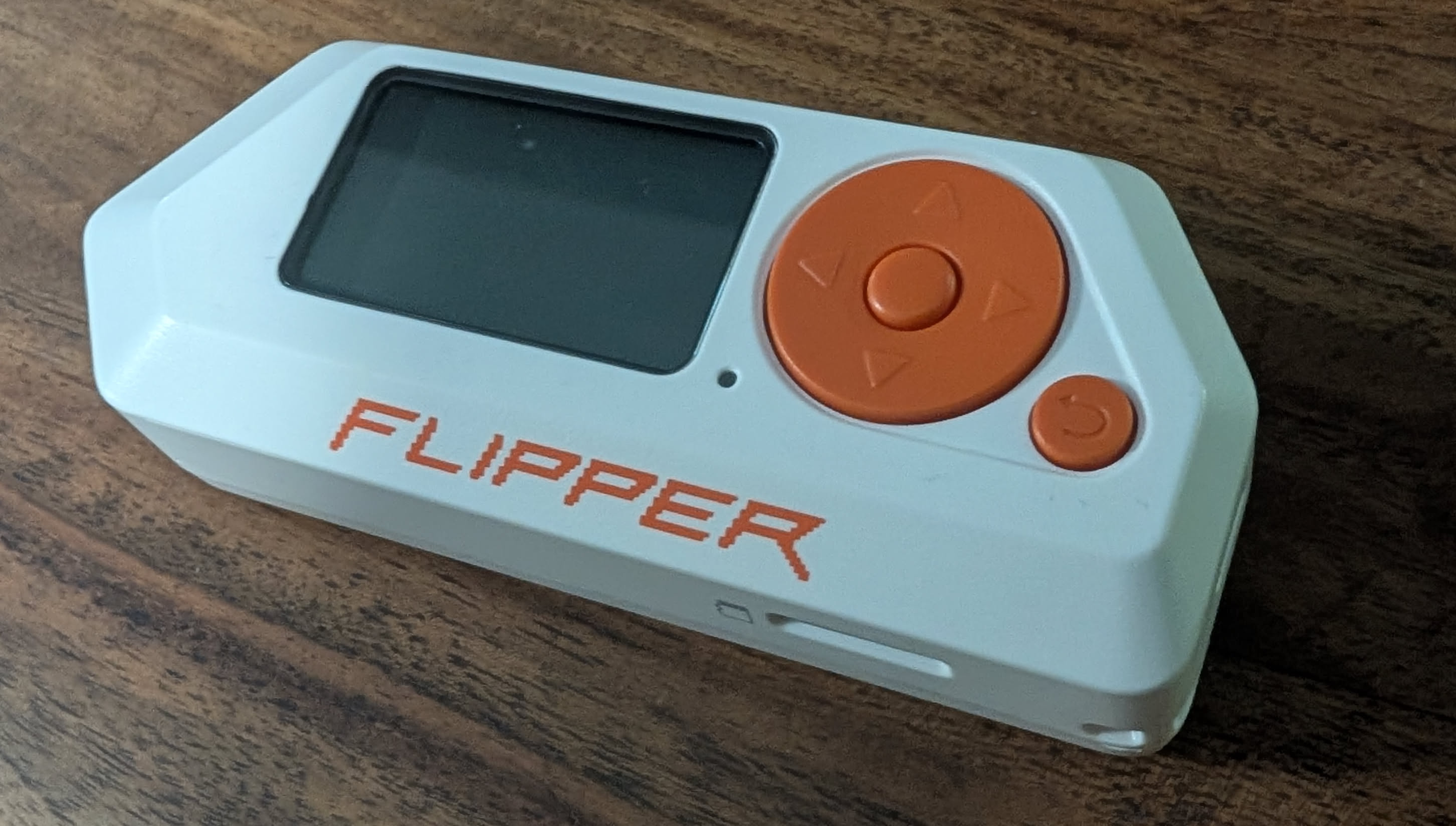
Most wireless AC outlet relays use Amplitude Shift Keying / On-Off Keying (ASK/OOK) fixed-code ICs (e.g. Princeton PT2262, SC5262, EV1527, or Holtek):
- Protocol Capture:
- Open Sub-GHz → Read on Flipper Zero.
- Transmit from factory remote: Flipper identifies frequency (433.92 MHz), bit length (e.g. 24-bit / 33-bit), hex payload, and pulse duration (e.g. ~291 µs).
- Raw Signal Capture (Fallback):
- Open Sub-GHz → Read RAW at
433.92 MHz(Modulation:AM650). - Record demodulated 433.92 MHz ASK/OOK pulses into raw
.subfiles.
- Open Sub-GHz → Read RAW at
- Validation via Replay:
- Replaying
.subfiles directly from Flipper Zero reliably triggered physical relays, confirming that recorded pulse sequences were valid.
- Replaying
- Pulse-Interval Extraction:
- High pulse ≈ 874 µs, Low pulse ≈ 291 µs for bit
'1' - High pulse ≈ 291 µs, Low pulse ≈ 874 µs for bit
'0' - Trailing sync gap ≈ 291 µs High, 10,190 µs Low (~10.2 ms)
- Fundamental clock tick: Te = 291.27 µs (3433.22 baud)
- High pulse ≈ 874 µs, Low pulse ≈ 291 µs for bit
- Isolating the Transceiver Issue: Because Flipper Zero replay worked consistently while initial YARD Stick One transmissions failed, we confirmed the payload bitstreams were correct, isolating the root cause to the CC1111 reference crystal configuration.
Crystal Oscillator Frequency (24.0 MHz vs 26.0 MHz)
The most elusive obstacle was the RF carrier frequency register calculation:
- The Assumption: Standard Texas Instruments CC1101 transceiver chips commonly use a 26.0 MHz reference crystal. Using the standard TI datasheet formula with a 26 MHz clock calculated the frequency control word as
FREQ = 0x10B071for 433.92 MHz:FREQ = (433,920,000 / 26,000,000) × 2^16 = 1,093,745 = 0x10B071
- The Reality: The CC1111 USB SoC on the YARD Stick One does not use a 26 MHz crystal. Because USB 2.0 Full-Speed requires a 48 MHz clock derived from a 2x PLL, the CC1111 utilizes a 24.0 MHz reference crystal (
f_XOSC = 24.0 MHz). - The Consequence: When
0x10B071was loaded into a 24 MHz CC1111, the actual emitted RF carrier was:Actual Frequency = (1,093,745 × 24,000,000) / 2^16 = 400.54 MHzThe transceiver was broadcasting over 33 MHz off-target, resulting in zero signal reaching the 433.92 MHz receivers.
- The Fix: Calibrating for the true 24.0 MHz crystal yielded the exact frequency registers:
FREQ = (433,920,000 / 24,000,000) × 2^16 = 1,184,883 = 0x121473FREQ2 = 0x12,FREQ1 = 0x14,FREQ0 = 0x73(with ChannelCHANNR = 0x00).
Pulse Framing & Sync Gap Correction
From Flipper Zero capture analysis:
- Bit
0: 1 tick High, 3 ticks Low (1000-> 291 µs High, 874 µs Low) - Bit
1: 3 ticks High, 1 tick Low (1110-> 874 µs High, 291 µs Low) - Sync Gap: 1 tick High, 35 ticks Low (
1+ 35 zeros -> 291 µs High, 10.19 ms Low)
The Framing Bug: Initial synthetic generators placed a sync pulse at the beginning of the frame and another sync pulse at the end. When repeating frames in a burst, this created two back-to-back sync gaps (>21 ms of dead carrier), which caused the relay microcontroller's state machine to timeout and drop the frame.
The Fix: A frame consists strictly of the 33 data bits followed by a single trailing sync gap:
- Frame Composition = (33 × 4) + 36 = 168 ticks = 21 bytes (48.93 ms)
Multi-Frame Contiguous Streaming vs Single-Shot Bursts
Consumer 433 MHz ASK/OOK receivers use simple superheterodyne/regenerative circuits with slow Automatic Gain Control (AGC). Single-shot transmissions or frames separated by USB packet latency fail because the receiver AGC cannot settle in time.
The Fix: In the studio-power script, the 21-byte frame is multiplied into a continuous 630-byte stream (30 consecutive frames) transmitted in a single uninterrupted RF burst:
- Burst Duration = (630 bytes × 8 bits) / 3433.22 baud = 1.468 seconds
This ensures the receiver AGC locks on and decodes the command reliably.
5. Protocol Specification (Princeton / Fosmon 33-Bit PWM)
Timing & Waveform Structure
- Fundamental Clock Tick Period (Te): 291.27 µs (3433.22 baud)
- Bit Symbol
0: 1 tick High (291 µs), 3 ticks Low (874 µs) ->1000 - Bit Symbol
1: 3 ticks High (874 µs), 1 tick Low (291 µs) ->1110 - Trailing Sync Pulse: 1 tick High (291 µs), 35 ticks Low (10.19 ms) ->
1+ 35 zeros
Bit '0':  +---+
          |   |___________________   (1 tick high, 3 ticks low)
          <Te><------ 3Te ------->

Bit '1':  +---------------+
          |               |_______   (3 ticks high, 1 tick low)
          <----- 3Te ----><--Te-->

Sync:     +---+
          |   |____________________________________________________  (1 tick high, 35 ticks low)
          <Te><---------------------- 35Te ----------------------->
6. CC1111 Hardware Register Map & RfCat USB Protocol
The standalone native C driver (yard_tx.c / cc1111_rfcat.h) controls the transceiver directly using libusb-1.0 control transfers and bulk endpoints:
RfCat USB Vendor Requests (bmRequestType = 0x40)
0x00(RFCAT_REQ_PING): Verifies firmware communication.0x01(RFCAT_REQ_STROBE): Dispatches CC1111 radio command strobes (0x01=STX,0x04=SIDLE).0x03(RFCAT_REQ_PEEK): Reads memory-mapped SFR / XDATA registers.0x04(RFCAT_REQ_POKE): Writes memory-mapped SFR / XDATA registers.0x10(RFCAT_REQ_SET_AMP_MODE): Toggles Skyworks SE2431L Power Amplifier (1= ON,0= Bypass).EP 0x04(RFCAT_EP_BULK_OUT): High-speed USB Bulk OUT endpoint for streaming OOK baseband byte frames directly to the CC1111 TX FIFO.
Calibrated CC1111 Transceiver Register Map
| Register Name | XDATA Address | Config Value | Register Function & Mathematical Derivation |
|---|---|---|---|
FREQ2 |
0xDF09 |
0x12 |
Frequency Synthesizer MSB: FREQ = (433,920,000 / 24,000,000) × 2^16 = 0x121473 |
FREQ1 |
0xDF0A |
0x14 |
Frequency Synthesizer Middle Byte |
FREQ0 |
0xDF0B |
0x73 |
Frequency Synthesizer LSB |
CHANNR |
0xDF0C |
0x00 |
Base RF channel index (0) |
MDMCFG4 |
0xDF10 |
0x08 |
Filter bandwidth (187.5 kHz) & Data Rate Exponent (DRATE-E = 8) |
MDMCFG3 |
0xDF11 |
0x84 |
Data Rate Mantissa (DRATE-M = 132): Baud = ((256 + 132) × 2^8 / 2^28) × 24 MHz = 3433.22 baud |
MDMCFG2 |
0xDF12 |
0x30 |
Modulation format: ASK/OOK (0x30), preamble/sync word disabled |
MDMCFG1 |
0xDF13 |
0x00 |
Zero extra preamble bytes |
MDMCFG0 |
0xDF14 |
0xF8 |
Channel spacing exponent |
FREND0 |
0xDF17 |
0x01 |
Sets PA output power level index 1 for bit symbol 1 |
MCSM0 |
0xDF18 |
0x18 |
Automatic synthesizer calibration on IDLE-to-TX transition |
PA_TABLE1 |
0xDF2F |
0xC0 |
Maximum RF output power (+10 dBm base, +20 dBm via SE2431L amplifier) |
PA_TABLE0 |
0xDF2E |
0x00 |
Carrier cut-off for OOK Low level |
PKTCTRL0 |
0xDF08 |
0x00 |
Fixed packet length mode |
RFST |
0xDF36 |
0x01 |
Radio Command Strobe: STX (Start Transmission) |
7. Studio Device Payload Database
Every studio outlet has a dedicated 33-bit code for ON and OFF:
| Device Key | Device Name | 33-Bit Binary Bitstream (ON / OFF) | Hex Payload (ON / OFF) |
|---|---|---|---|
mrc |
Moroccan Lamp | 110100001100000100001011011110100 (ON)110100001100000100001010011110110 (OFF) |
0x1a18216f40x1a18214f6 |
rack |
Recording Rack | 001011011010100100001011100110000 (ON)001011011010100100001010100110010 (OFF) |
0x5b5217300x5b521532 |
computer |
Studio Computer | 001011011010100100001101100111110 (ON)001011011010100100001100100111100 (OFF) |
0x5b521b3e0x5b52193c |
sub |
Subwoofer | 010110100111010000001101000111000 (ON)010110100111010000001100000111010 (OFF) |
0xb4e81a380xb4e8183a |
pa |
Main PA Speakers | 010110100111010000001011000110100 (ON)010110100111010000001010000110110 (OFF) |
0xb4e816340xb4e81436 |
tv |
TV Monitor | 010110100111010000001111000111100 (ON)010110100111010000001110000111110 (OFF) |
0xb4e81e3c0xb4e81c3e |
neewer |
Neewer LED Panels | 001010010110011000001111010101110 (ON)001010010110011000001110010101100 (OFF) |
0x52cc1eae0x52cc1cac |
8. Authentik & Mobile 1-Tap Trigger
To control the studio securely from any phone or device on the LAN/WAN:
- Reverse Proxy & Forward Auth:
- Nginx on
ulforwardshttps://studio.drheck.dev/api/powerthrough Authentik forward-auth.
- Nginx on
- PiKVM Local Webhook:
- When authorized, the proxy issues an API call to a lightweight Python webhook running on
pikvm-studio.
- When authorized, the proxy issues an API call to a lightweight Python webhook running on
- Mobile Launcher Shortcuts:
- iOS: In the Shortcuts app, create an action: Get contents of URL
POST https://studio.drheck.dev/api/power/on. - Android: Configure a launcher widget using the HTTP Shortcuts app.
- Siri / Voice: Trigger via "Hey Siri, turn on recording studio".
- iOS: In the Shortcuts app, create an action: Get contents of URL
9. Signal Synthesis Implementation (Python)
To generate and transmit any command from scratch using rflib:
#!/usr/bin/env python3
import sys, time
import rflib

def encode_pwm_exact(bit_string):
    """Converts a 33-bit code into an exact 21-byte OOK frame at 3433 baud."""
    raw = ""
    for bit in bit_string:
        if bit == '1':
            raw += "1110"  # 3 ticks high, 1 tick low
        elif bit == '0':
            raw += "1000"  # 1 tick high, 3 ticks low
    # Append trailing sync pulse: 1 tick high, 35 ticks low (~10.2 ms)
    raw += "1" + ("0" * 35)

    while len(raw) % 8 != 0:
        raw += "0"

    return bytes(int(raw[i:i+8], 2) for i in range(0, len(raw), 8))

def send_power_signal(bit_string, repeats=30):
    payload = encode_pwm_exact(bit_string)
    d = rflib.RfCat()
    d.setFreq(433920000)
    d.setMdmModulation(rflib.MOD_ASK_OOK)
    d.setMdmDRate(3433)
    d.setMdmSyncMode(0)
    d.setMaxPower()
    d.setAmpMode(1)  # Enable hardware RF power amplifier
    d.RFxmit(payload * repeats)
    d.cleanup()

# Example: Turn ON Moroccan Lamp
send_power_signal("110100001100000100001011011110100", repeats=30)
10. CLI Tool: studio-power
The utility is permanently installed on pikvm-studio at /usr/local/bin/studio-power.
Command Syntax
# Toggle individual devices:
$ sudo studio-power mrc on
$ sudo studio-power mrc off

$ sudo studio-power rack on
$ sudo studio-power rack off

$ sudo studio-power computer on
$ sudo studio-power computer off

$ sudo studio-power sub on
$ sudo studio-power sub off

$ sudo studio-power pa on
$ sudo studio-power pa off

$ sudo studio-power tv on
$ sudo studio-power tv off

$ sudo studio-power neewer on
$ sudo studio-power neewer off

# Session management (turn entire studio on or off):
$ sudo studio-power all on
$ sudo studio-power all off

# List devices:
$ studio-power list
11. External References & FCC Certification Links
- Git Repository: https://git.drheck.dev/luke/studio_yardstick
- Fosmon Hardware & FCC Filings:
- Transceiver Hardware & Firmware:
Studio Control Host & Remote Access
This page details the management nodes, network topology, SSH agent authentication chain, and operating system configurations for remote studio management.
1. Remote Access & SSH Socket Topology
All studio infrastructure is accessible securely through the main server, ul, via forwarded SSH authentication sockets:
+---------------------------------------------------------------------------------+
| Host: ul (ul.drheck.dev)                                                        |
| - Infrastructure Gateway                                                        |
| - Agent Socket Dir: ~/.ssh/agent/                                               |
+---------------------------------------------------------------------------------+
                    |                                             |
                    | SSH                                         | SSH
                    v                                             v
+---------------------------------------+     +-----------------------------------+
| Host: pikvm-studio                    |     | Host: bmo95                       |
| - IP: Static / DHCP Reservation       |     | - 48-Channel FireWire DAW Host    |
| - PiKVM V4 Plus Management            |     | - Linux 6.13 PREEMPT_RT Kernel    |
| - Sub-GHz RF Studio Power Automation  |     | - JACK & ALSA Real-time Audio     |
+---------------------------------------+     +-----------------------------------+
2. pikvm-studio Specifications & Filesystem Model
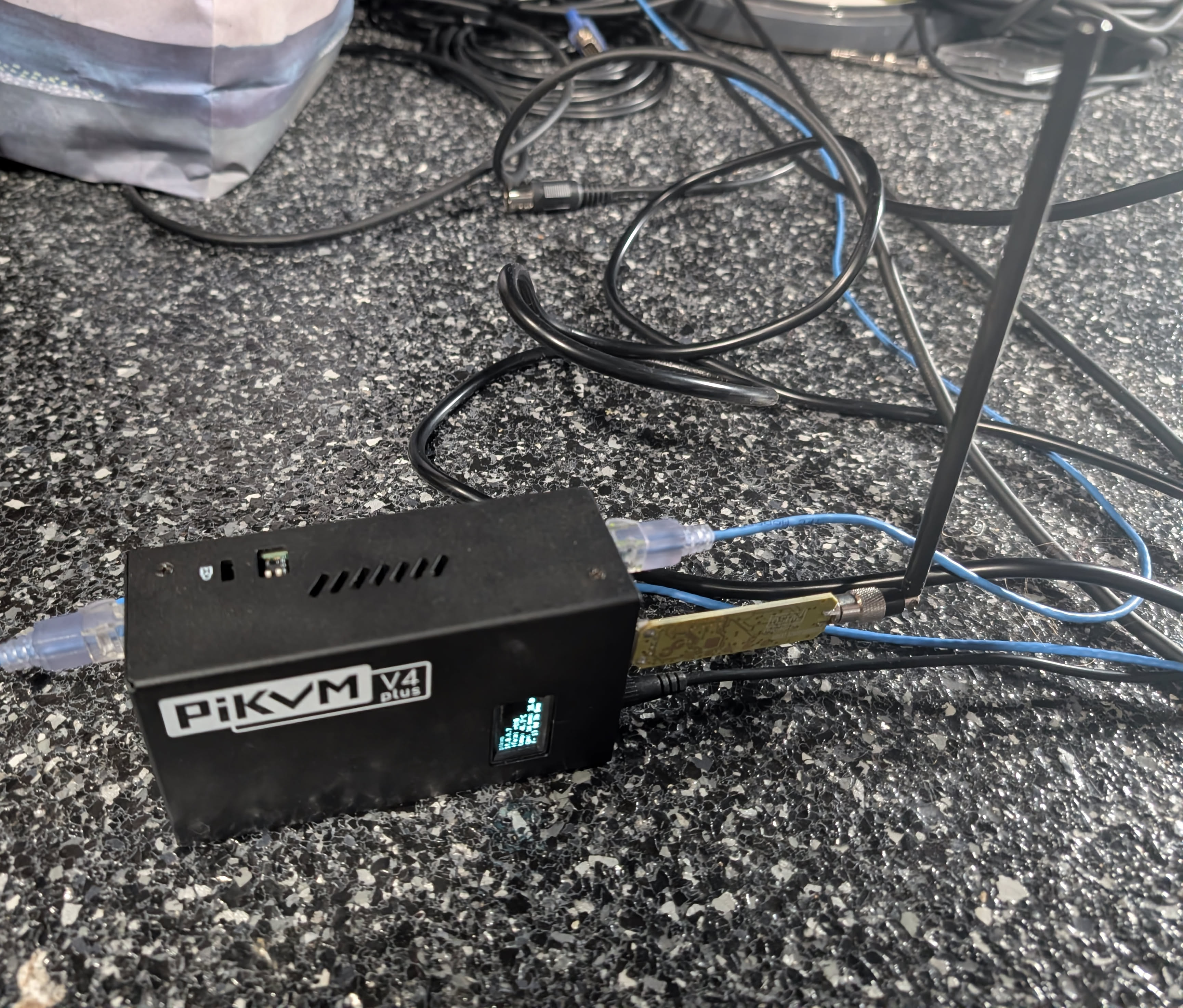
- Hardware: PiKVM V4 Plus (Raspberry Pi 4 Model B, 2GB RAM)
- Operating System: Arch Linux ARM (
aarch64, Linux 6.12.100-1-rpi) - Attached Peripherals:
- PiKVM V4 Plus capture & ATX power control board
- Great Scott Gadgets YARD Stick One (
1d50:605b, USB Bus 001)
Read-Only Root Filesystem (ro / rw)
To prevent SD card corruption during sudden power losses, pikvm-studio boots with a read-only root filesystem (/ mounted ro).
Modification Workflow
When installing new utilities, Python libraries, or modifying configuration:
# 1. Remount root partition as read-write
$ sudo rw

# 2. Make file modifications or package updates
$ sudo cp /tmp/studio-power /usr/local/bin/studio-power
$ sudo chmod +x /usr/local/bin/studio-power

# 3. Remount root partition back to read-only
$ sudo ro
Temporary work, logs, and transient scripts can also be written to /tmp (tmpfs) without switching to rw mode.
3. bmo95 Audio Host Specifications
- Architecture:
x86_64 - Kernel: Linux 6.13.0-rt-preempt
- Configuration Repository: link
Touch phone -> Studio turns on and starts recording
AKA: One-Click Mobile Studio Automation
This page outlines the end-to-end architecture, API integration layers, OSC/Lua communication protocols, and execution plan for triggering studio power, booting the DAW host, instantiating timestamped Ardour sessions from templates, arming target tracks, and rolling transport from a single mobile button.
1. End-to-End Workflow & Pipeline Architecture
The objective is a zero-touch "Quick Record" pipeline: pressing a single button on a mobile phone (iOS Shortcut, Android Widget, Telegram Bot, or PWA) triggers an automated multi-stage turn-up sequence across the studio network.
+---------------------------------------------------------------------------------------------------+
| Mobile Phone (iOS / Android / PWA)                                                                |
| [ 🔴 ONE-TOUCH QUICK RECORD ]                                                                     |
+---------------------------------------------------------------------------------------------------+
                                                  | POST https://studio.drheck.dev/api/quick-record
                                                  v
+---------------------------------------------------------------------------------------------------+
| Host: ul (Gateway Orchestrator & Fastify/Python API Service)                                      |
| 1. Dispatches RF power turn-on command to pikvm-studio                                            |
| 2. Triggers ATX power / Wake-on-LAN for DAW host (bmo95)                                          |
| 3. Polls bmo95 SSH & RT audio stack until ready                                                   |
| 4. Dispatches Ardour project instantiation & OSC track arming commands                            |
| 5. Pushes confirmation webhook / notification to phone                                            |
+-----------------------------------|---------------------------------------|-----------------------+
                                    |                                       |
                   SSH Command      |                                       | SSH / OSC (Port 3819)
                                    v                                       v
+-----------------------------------------------+   +-----------------------------------------------+
| Host: pikvm-studio (Sub-GHz Transceiver)      |   | Host: bmo95 (DAW Host)                        |
| - Runs: sudo studio-power all on              |   | - Boots PREEMPT_RT kernel                     |
| - Engages YARD Stick One at 433.92 MHz        |   | - Auto-starts JACK + zita bridges             |
| - Powers: Rack, Monitors, Moroccan Lamp, LEDs |   | - Launches Ardour with Session Template       |
| - Pulses ATX power header via GPIO / Relay    |   | - Arms selected tracks via OSC UDP 3819       |
+-----------------------------------------------+   | - Rolls global recording transport            |
                                                    +-----------------------------------------------+
2. Technical Integration Layers
Layer A: Studio Power & DAW Wakeup (pikvm-studio)
- RF Outlet Switching:
- API calls
pikvm-studio:sudo /usr/local/bin/studio-power all on(switches the Moroccan Lamp, Recording Rack Gear, the Subwoofer, PA Monitors, the TV, and Neewer LEDs).
- API calls
- DAW Host ATX Wake:
pikvm-studiotriggers the ATX power button onbmo95via PiKVM ATX header.
Layer B: Audio Stack & Real-Time Engine Initialization (bmo95)
When bmo95 boots, its systemd user units initialize audio backend:
# Auto-launched on bmo95 user session login:
$ systemctl --user start jack.service
$ systemctl --user start zita-a2j-blue.service zita-j2a-blue.service
$ systemctl --user start zita-a2j-green.service zita-j2a-green.service
$ systemctl --user start zita-a2j-yellow.service zita-j2a-yellow.service
$ ~/git/audio_config/profiles/jack-alsa/set-port-aliases.sh
Layer C: Ardour Headless/GUI Instantiation
Ardour natively supports automated session creation from templates via CLI:
$ DISPLAY=:0 ardour9 \
    --no-splash \
    --no-announcements \
    --template "48ch_Studio_Master" \
    --new "/data/sessions/Session_$(date +%Y-%m-%d_%H%M%S)"
--template <name>: Clones track structures, input/output bus routing, plugin chains, and monitor matrices from a predefined master studio template.--new <path>: Automatically creates and locks a timestamped project folder without interactive GUI dialogs.--no-splash&--no-announcements: Suppresses startup modal windows that block automation.
Layer D: Ardour Remote API Control (OSC & Lua)
Ardour provides two remote control APIs:
1. Open Sound Control (OSC) — UDP Port 3819
Ardour includes a comprehensive built-in OSC server that can be queried and triggered over UDP.
| OSC Address | Arguments | Action |
|---|---|---|
/strip/recenable |
i: strip_num, i: state (1/0) |
Arms or disarms a specific audio track |
/track/recenable |
s: track_name, i: state (1/0) |
Arms or disarms track by name (e.g. Red_01) |
/rec_enable_toggle |
(none) | Toggles global master record arm status |
/transport_record |
i: 1 |
Sets global transport record arm to ON |
/transport_play |
i: 1 |
Rolls transport (starts playback/recording) |
/transport_stop |
i: 1 |
Stops transport |
/save_state |
(none) | Flushes and saves session XML to disk |
/access_action |
s: "Action/Name" |
Executes any internal Ardour GUI menu action |
2. Native Lua Scripting (ardour-exec / OSC /eval)
Ardour includes an embedded Lua execution engine. Complex automation scripts (e.g., auto-detecting connected microphones, verifying input levels, and arming only active channels) can be evaluated dynamically:
-- Lua script to arm all capture tracks matching prefix
for r in Session:get_routes():iter() do
    local track = r:to_track()
    if not track:is_null() and track:name():match("^Red_") then
        track:rec_enable_control():set_value(1, PBD.GroupControlDisposition.NoGroup)
    end
end
Session:maybe_enable_record()
Session:request_transport_speed(1.0, true, ARDOUR.TransportRequestSource.TRS_UI)
3. Implementation Plan & Execution Phases
The automation will be rolled out across 4 distinct phases:
Phase 1: Ardour Template & OSC Server Configuration (bmo95)
- Create master 48-channel template (
48ch_Studio_Master) with calibrated input routing (Red_01..12,Blue_01..12,Green_01..12,Yellow_01..12). - Enable and persist Ardour OSC server on UDP port 3819 (
Preferences -> Control Surfaces -> Open Sound Control). - Build a Python helper script
/usr/local/bin/ardour-controlonbmo95usingpython-oscto test track arming, session saving, and transport control via CLI.
Phase 2: Host Wakeup & Readiness Polling (ul & pikvm-studio)
- Configure Wake-on-LAN and PiKVM ATX power button trigger for
bmo95. - Write an orchestration wrapper script
/home/luke/bin/studio-quick-recordonulthat:- Sends RF power command
sudo studio-power all ontopikvm-studio. - Sends ATX boot command to
bmo95. - Polls
ssh -q bmo95until the PREEMPT_RT kernel is responsive (timeout: 45s). - Confirms
jack.serviceand all 3zita-a2j-*duplex bridges are active.
- Sends RF power command
Phase 3: Automated Session Launch & Transport Trigger
- Extend
/home/luke/bin/studio-quick-recordto invoke Ardour session creation via SSH. - Send OSC burst to arm user-selected tracks (e.g. Drums, Vocals, Master Stereo Bus).
- Roll recording transport and log initial take time.
Phase 4: Mobile Webhook & UI Control Endpoint
- Deploy a lightweight authenticated REST service on
ul(Fastify / Python Flask on dedicated ULA IP). - Expose two endpoints behind Authentik OIDC single sign-on / API token:
POST /api/studio/record/start: Powers studio, boots host, opens session, arms tracks, rolls recording.POST /api/studio/record/stop: Stops transport, saves session, optionally powers down.
- Configure iOS Shortcuts / Android Widget / Telegram Bot webhook for single-tap activation from any smartphone.
4. Python Ardour Remote Controller Reference
#!/usr/bin/env python3
"""Ardour Remote Control Client via OSC (UDP 3819)"""

import sys, time
from pythonosc import udp_client

ARDOUR_IP = "127.0.0.1"
ARDOUR_PORT = 3819

def get_client(ip=ARDOUR_IP, port=ARDOUR_PORT):
    return udp_client.SimpleUDPClient(ip, port)

def start_recording(client, tracks_to_arm=[1, 2, 3, 4]):
    print("-> Arming tracks:", tracks_to_arm)
    for track_num in tracks_to_arm:
        client.send_message("/strip/recenable", [track_num, 1])
        time.sleep(0.05)

    print("-> Enabling global record arm...")
    client.send_message("/transport_record", 1)
    time.sleep(0.1)

    print("-> Rolling transport...")
    client.send_message("/transport_play", 1)
    print("-> Recording active.")

def stop_and_save(client):
    print("-> Stopping transport...")
    client.send_message("/transport_stop", 1)
    time.sleep(0.2)
    print("-> Saving session...")
    client.send_message("/save_state", [])
    print("-> Session saved successfully.")

if __name__ == "__main__":
    if len(sys.argv) < 2:
        print("Usage: ardour-control <start|stop|save>")
        sys.exit(1)

    c = get_client()
    cmd = sys.argv[1].lower()
    if cmd == "start":
        start_recording(c)
    elif cmd == "stop":
        stop_and_save(c)
    elif cmd == "save":
        c.send_message("/save_state", [])
Pikvm-studio Setup Detail
Documentation and system management guide for the dedicated studio KVM-over-IP appliance (pikvm-studio).
- Repository: link
- Hardware Model: PiKVM V4 Plus (Raspberry Pi Compute Module 4 Rev 1.1)
- Target Workstation:
bmo95(Linux Audio / DAW Workstation)
1. Video Architecture: 1080p @ 60.000 Hz Pass-Through
PiKVM V4 Plus features a built-in HDMI hardware pass-through port (OUT2) and a TC358743 HDMI-to-CSI capture bridge. By default, PiKVM V4 advertises a 1920x1200 EDID. When connected to a standard 1080p physical display, the image would be cropped from the bottom.
Applied Video Optimizations
- 1080p EDID Preset (No 1920x1200 Mode):
- Imported and applied the
v4plus.no-1920x1200EDID preset to/etc/kvmd/tc358743-edid.hexviakvmd-edidconf. - Ensures the target host (
bmo95) negotiates uncropped 1920x1080 @ 60.000 Hz for both remote web streaming and the physical monitor onOUT2.
- Imported and applied the
- GPU Clock & H.264 60 FPS Boost:
- Added
gpu_freq=700to/boot/config.txtto provide sufficient GPU clock headroom for full 60fps hardware H.264 encoding. - Configured KVMD streamer overrides in
/etc/kvmd/override.yaml:kvmd: streamer: h264_boost: true desired_fps: default: 60
- Added
Physical Wiring
- HDMI Input (Rear Bottom Right): Connected to
bmo95AMD Radeon GPU HDMI output. - HDMI Output 2 (
OUT2): Connected to the local physical studio monitor (pass-through). - USB-C OTG (Rear): Connected to
bmo95USB port for keyboard/mouse HID emulation and mass storage drive. - RJ45 Ethernet (Front): Connected to local studio LAN.
2. Configuration Management: Chezmoi
Configuration files across /etc (ext4) and /boot (FAT32) are tracked in Git using Chezmoi.
Why Chezmoi on PiKVM?
- FAT32
/bootCompatibility: The Raspberry Pi bootloader partition (/boot) uses a VFAT filesystem which does not support Linux symlinks. Chezmoi uses a Source $\rightarrow$ Target Copy Model, rendering physical files without symlink errors. - Security & Ownership Compliance: Security-sensitive utilities (such as
sudoand PAM) require configuration files to be owned byroot:rootwith strict permissions (e.g.0440). Chezmoi preserves exact permissions and system UIDs rather than pointing symlinks to user-owned directories. - Drift Detection:
chezmoi diffprovides instant comparison between Git state and the live appliance filesystem.
Chezmoi Configuration
Located in /home/luke/.config/chezmoi/chezmoi.yaml:
destDir: "/"
sourceDir: "/home/luke/git/pikvm_studio"
Git History Structure
The repository at https://git.drheck.dev/luke/pikvm_studio maintains a 2-stage commit baseline:
feat(pikvm): baseline vanilla system configuration— Stock OS overrides, default 1920x1200 EDID, and stock/boot/config.txt.feat(video): configure 1080p60 pass-through, H.264 boost, and GPU frequency— All active studio customizations.
Running git diff HEAD~1 clearly documents all modifications relative to factory OS defaults.
3. PiKVM Read-Only Lifecycle & Chezmoi Workflow
PiKVM OS operates with read-only root (/) and boot (/boot) partitions to protect flash storage from corruption. When managing configurations with Chezmoi, follow these standard workflows:
A. Checking for Configuration Drift
To compare the Git repository against the live system:
chezmoi diff
B. Editing and Applying Changes
To edit a tracked file and deploy it to the live system:
# 1. Remount filesystem as read-write
sudo rw

# 2. Edit the file in Chezmoi
chezmoi edit /etc/kvmd/override.yaml

# 3. Preview changes
chezmoi diff

# 4. Apply changes to disk
sudo chezmoi apply

# 5. Commit and push to Forgejo
cd ~/git/pikvm_studio
git add .
git commit -S -m "feat: description of change"
gpush pikvm_studio

# 6. Return filesystem to read-only
sudo ro
C. Ingesting Modifications Made Directly on Disk
If a file was modified outside Chezmoi (e.g. via kvmd-override or kvmd-edidconf):
sudo rw
chezmoi re-add /etc/kvmd/override.yaml
chezmoi re-add /etc/kvmd/tc358743-edid.hex

cd ~/git/pikvm_studio
git add .
git commit -S -m "feat: update kvmd settings"
gpush pikvm_studio

sudo ro
4. SSH & GPG Key Management
- Terminal Pinentry:
~/.gnupg/gpg-agent.confis configured withpinentry-program /usr/bin/pinentry-cursesto ensure GPG password prompts display cleanly over headless SSH sessions. - Password Store: Forgejo API tokens (
forgejo/token/*) are managed viapassand pushed using~/bin/gpush pass.
Rack
TODO: Rack info