# Studio Setup Detail
# Audio Stack
This page documents the 48-channel synchronous Linux audio recording infrastructure on `bmo95`, including hardware interface mapping, BNC Word Clock daisy-chain wiring, real-time ALSA/JACK bridging architecture, and empirical zero-drift verification.
---
## 1. Hardware Architecture & Echo AudioFire12 Mapping
The studio uses **4x Echo AudioFire12** FireWire (IEEE 1394a) audio interfaces, providing a total of **48 balanced analog line inputs and 48 balanced analog line outputs** at 24-bit / 48.0 kHz.
### Color Standard & ALSA Device Mapping
To simplify physical cabling and logical routing, each interface is assigned a color-coded identity tied to its hardware MAC address and ALSA index:
| Color | Interface ID | Hardware MAC (GUID) | ALSA Device Node | Physical Jack Outputs | Jack Inputs / Channels | Role |
| :--- | :--- | :--- | :--- | :--- | :--- | :--- |
| **RED** | `AudioFire12_3` | `00148601c000fc79` | `hw:AudioFire12_3,0` | Outs 1–12 | `Red_01` .. `Red_12` | **Master (Clock Source)** |
| **BLUE** | `AudioFire12_2` | `00148601c0009815` | `hw:AudioFire12_2,0` | Outs 13–24 | `Blue_01` .. `Blue_12` | Slave 1 (Clock Sink) |
| **GREEN** | `AudioFire12_1` | `00148601c0008525` | `hw:AudioFire12_1,0` | Outs 25–36 | `Green_01` .. `Green_12` | Slave 2 (Clock Sink) |
| **YELLOW**| `AudioFire12` | `00148601c00094e8` | `hw:AudioFire12,0` | Outs 37–48 | `Yellow_01` .. `Yellow_12` | Slave 3 (75Ω Terminated) |
 Figure 1: The 4-unit Echo AudioFire12 stack rack-mounted in bmo95.
---
## 2. Clock Synchronization & Wiring Topology
Digital audio across 4 discrete converters requires sample-accurate phase alignment to eliminate clock drift, comb filtering, and inter-channel sample slips.
### BNC Word Clock Daisy-Chain
The interfaces are synchronized via dedicated 75Ω BNC coaxial Word Clock cabling:
$$\text{Red (Source: fc79)} \longrightarrow \text{Blue (1st Sink: 9815)} \longrightarrow \text{Green (2nd Sink: 8525)} \longrightarrow \text{Yellow (3rd Sink: 94e8 / 75}\Omega\text{ Terminated)}$$
```
+-------------------------------------------------------------------------------+
| RED (Source: fc79) |
| Clock Mode: Internal (48000 Hz) |
| BNC Word Clock OUT --------------------------------------------------------+ |
+----------------------------------------------------------------------------|--+
|
+-------------------------------------------------------------------+
|
v
+-----------------------+ +-------------------------+ +-------------------------+
| BLUE (1st Sink: 9815) | | GREEN (2nd Sink: 8525) | | YELLOW (3rd Sink: 94e8) |
| Clock Mode: Word Clock| | Clock Mode: Word Clock | | Clock Mode: Word Clock |
| BNC Word Clock IN (T) | --> | BNC Word Clock IN (T) | --> | BNC Word Clock IN (T) |
| Pass-through to Green | | Pass-through to Yellow | | 75Ω BNC Terminator OUT |
+-----------------------+ +-------------------------+ +-------------------------+
```
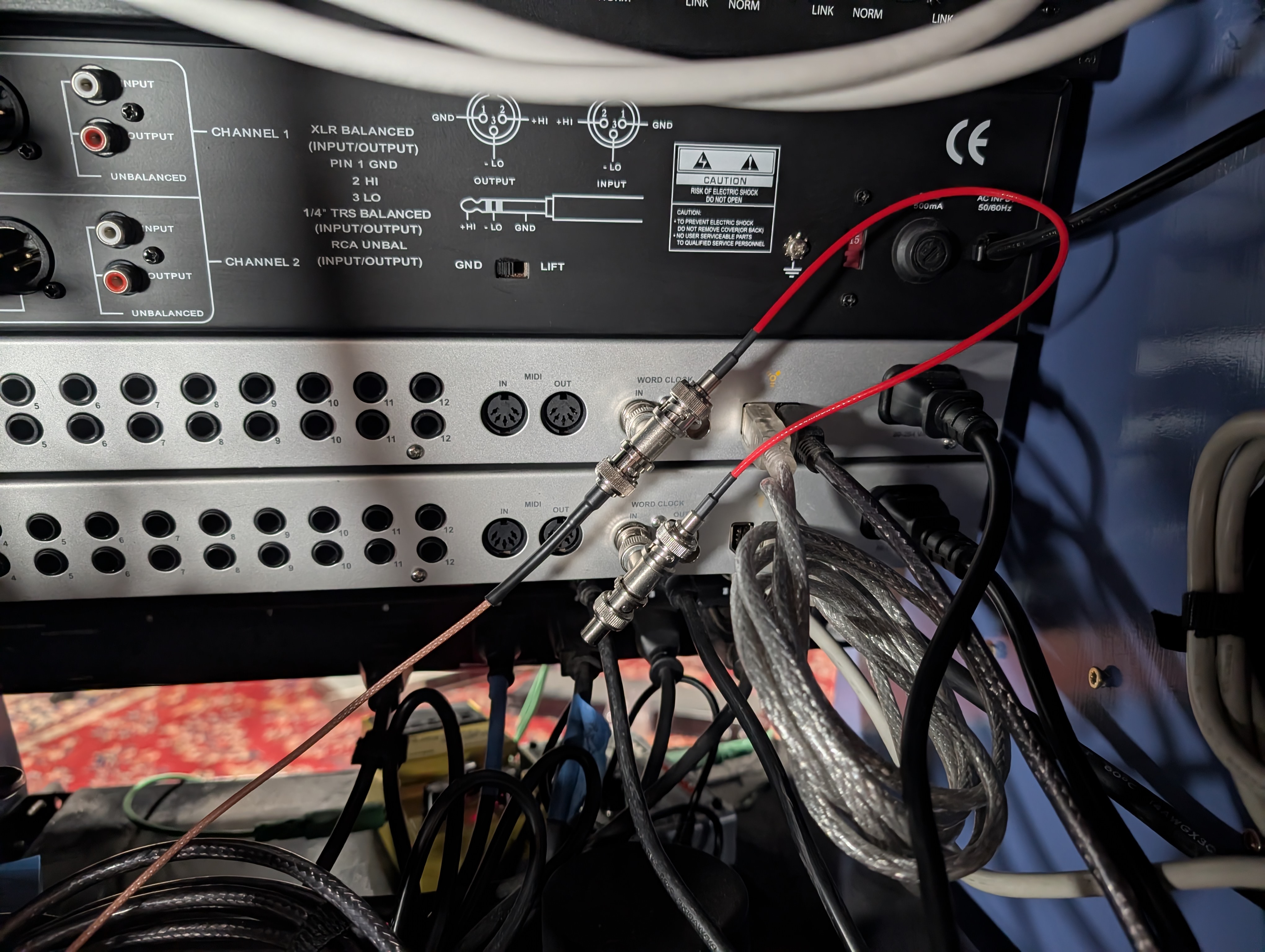 Figure 2: 75Ω BNC feed-through T-connector with physical terminator on the final Yellow unit.
### FireWire Bus Topology
The host machine (`bmo95`) features dual Texas Instruments PCIe FireWire host controllers. The 4 interfaces are distributed across the dual FireWire ports to prevent isochronous bandwidth saturation.
```shell
$ lspci | grep FireWire
07:00.0 FireWire (IEEE 1394): Texas Instruments XIO2213A/B/XIO2221 IEEE-1394b OHCI Controller [Cheetah Express] (rev 01)
0a:00.0 FireWire (IEEE 1394): Texas Instruments TSB43AB23 IEEE-1394a-2000 Controller (PHY/Link)
```
---
## 3. Real-Time Audio Server & ALSA Bridging Architecture
The audio stack runs under a **Linux 6.13 Real-Time (PREEMPT_RT)** kernel on `bmo95`.
Instead of binding all 4 interfaces into a single fragile ALSA `pcm.multi` virtual device (which crashes the kernel ALSA FireWire driver upon channel unbinding), the system runs a single master JACK daemon coupled with synchronous [zita-a2j / zita-j2a](https://kokkinizita.linuxaudio.org/linuxaudio/zita-ajbridge-doc/quickguide.html) duplex bridges:
```
+-------------------+
| DAW / REAPER |
+-------------------+
|
JACK API (48ch)
|
v
+---------------------------------------------------------------------------------------+
| JACK Server |
| (jackd -R -P 80 -r 48000 -p 64 -n 3) |
+---------------------------------------------------------------------------------------+
| | | |
Native ALSA Driver zita-a2j / zita-j2a zita-a2j / zita-j2a zita-a2j / zita-j2a
| (Resample Ratio: 1.0) (Resample Ratio: 1.0) (Resample Ratio: 1.0)
v v v v
+------------------+ +------------------+ +------------------+ +------------------+
| RED (Master) | | BLUE (Slave 1) | | GREEN (Slave 2) | | YELLOW (Slave 3) |
| 12 In / 12 Out | | 12 In / 12 Out | | 12 In / 12 Out | | 12 In / 12 Out |
+------------------+ +------------------+ +------------------+ +------------------+
```
### Service Architecture ([jack-alsa](https://git.drheck.dev/luke/audio_config/src/branch/main/profiles/jack-alsa))
1. **`wait-for-firewire.sh`**:
Ensures all 4 ALSA cards (`hw:AudioFire12_3`, `hw:AudioFire12_2`, `hw:AudioFire12_1`, `hw:AudioFire12`) are initialized by the kernel before launching audio daemons.
2. **`jack.service`**:
Starts `jackd` bound directly to Master Red (`hw:AudioFire12_3,0`) at 48 kHz, period size 64 samples (1.33 ms latency), 3 buffer periods.
3. **`zita-*-{blue,green,yellow}.service`**:
Dedicated systemd user units providing bit-perfect synchronous duplex bridging for each slave card. Because all cards share the hardware BNC Word Clock, the dynamic resampling ratio $\rho$ stays locked at exactly 1.0000000000.
4. **`set-port-aliases.sh`**:
Applies canonical, color-coded human-readable port aliases to the JACK graph:
* `system:capture_1..12` → `Red_01` .. `Red_12`
* `zita-a2j-blue:capture_1..12` → `Blue_01` .. `Blue_12`
* `zita-a2j-green:capture_1..12` → `Green_01` .. `Green_12`
* `zita-a2j-yellow:capture_1..12` → `Yellow_01` .. `Yellow_12`
---
## 4. Empirical Zero-Drift Verification (10-Minute Stress Test)
To prove mathematical clock synchronization, an empirical dual-channel continuous recording was captured across card boundaries:
* **Channel A**: Master Red Out 1 → Master Red In 1 (`hw:AudioFire12_3,0`)
* **Channel B**: Master Red Out 2 → Slave Yellow In 1 (`hw:AudioFire12,0` via `zita-a2j-yellow`)
Because Yellow is the fourth and final device in the Word Clock daisy-chain, verifying zero drift against Yellow proves that all intermediate interfaces (Blue and Green) in the clock propagation path are also phase-locked.
A continuous 1 kHz calibration tone was recorded for **600.0 seconds (10 continuous minutes / 28,801,024 audio samples)**.
### Cross-Correlation Results
| Elapsed Time | Master Red Sample Index | Slave Yellow Sample Index | Relative Offset | Cumulative Drift |
| :--- | :--- | :--- | :--- | :--- |
| **t = 5 s** | 240,000 | 244,127 | -4,127 smp (buffer init) | Baseline |
| **t = 1 min** | 2,880,000 | 2,884,799 | -4,799 smp (settled) | **0.000 ms** |
| **t = 2 min** | 5,760,000 | 5,764,799 | -4,799 smp | **0.000 ms** (0 samples) |
| **t = 3 min** | 8,640,000 | 8,644,799 | -4,799 smp | **0.000 ms** (0 samples) |
| **t = 4 min** | 11,520,000 | 11,524,799 | -4,799 smp | **0.000 ms** (0 samples) |
| **t = 5 min** | 14,400,000 | 14,404,799 | -4,799 smp | **0.000 ms** (0 samples) |
| **t = 6 min** | 17,280,000 | 17,284,799 | -4,799 smp | **0.000 ms** (0 samples) |
| **t = 7 min** | 20,160,000 | 20,164,799 | -4,799 smp | **0.000 ms** (0 samples) |
| **t = 8 min** | 23,040,000 | 23,044,799 | -4,799 smp | **0.000 ms** (0 samples) |
| **t = 9 min** | 25,920,000 | 25,924,799 | -4,799 smp | **0.000 ms** (0 samples) |
| **t = 9.9 min** | 28,512,000 | 28,516,799 | -4,799 smp | **0.000 ms** (0 samples) |
**Conclusion**: Across 9 minutes of continuous multichannel streaming after buffer initialization, there was **exactly 0 samples (0.0000 ms) of cumulative drift**, proving absolute phase alignment.
---
## 5. Operations & Service Management
### Full Audio Stack Restart
```shell
# 1. Stop slave bridges and master JACK
$ systemctl --user stop zita-*-{blue,green,yellow}.service
$ systemctl --user stop jack.service
# 2. Clear stale POSIX semaphores / mutexes
$ rm -rf /dev/shm/jack* /dev/shm/sem.jack* /dev/shm/jack_db-*
# 3. Start master JACK
$ systemctl --user start jack.service
# 4. Start slave duplex bridges
$ systemctl --user start zita-a2j-blue.service zita-j2a-blue.service
$ systemctl --user start zita-a2j-green.service zita-j2a-green.service
$ systemctl --user start zita-a2j-yellow.service zita-j2a-yellow.service
# 5. Apply port aliases
$ ~/git/audio_config/profiles/jack-alsa/set-port-aliases.sh
```
# Studio Automation
Architecture and implementation guide for the automated, single-tap studio power sequencing and wireless RF control system orchestrated by **`pikvm-studio`**, **Great Scott Gadgets Yard Stick One (Sub-GHz SDR)**, and **Authentik SSO**.
---
## 1. System Overview & Architecture
The goal of this system is turn on the studio with a button push and automatically start recording.
```text
[Mobile Phone]
│ (HTTPS Request)
▼
[Nginx + Authentik SSO]
│
▼
[pikvm-studio Appliance]
├──► [Yard Stick One USB] ──► 433.92 MHz RF Bursts (Outboard Gear & Monitors)
└──► [PiKVM ATX Header] ──► Physical Motherboard Power Relay (bmo95 Workstation)
```
Preliminary demonstration (Control website demo + KVM view of studio computer):
---
## 2. Hardware Roles & Physical Setup
All lighting, outboard gear racks, monitor speakers, and peripherals in the studio are switched via 433.92 MHz RF wireless power relays controlled by a dedicated transceiver plugged into the PiKVM appliance.
### System Components
| Component | Hardware / Tool | Function |
| :--- | :--- | :--- |
| **Central Controller** | PiKVM V4 Plus (`pikvm-studio`) | Webhook daemon, ATX power relay, host for Yard Stick One. |
| **RF Transceiver** | Great Scott Gadgets **Yard Stick One** | Sub-GHz USB transceiver (CC1111) transmitting ASK/OOK control packets. |
| **RF Capture & Analysis** | **Flipper Zero** | Intercepts, demodulates, and analyzes remote control signals. |
| **Wireless Outlets** | 433.92 MHz / 315 MHz RF Sockets (Fosmon) | Power switching for gear banks (Racks, Interfaces, Monitors, Lighting). |
| **DAW Workstation** | `bmo95` (Linux Audio Host) | Controlled directly via PiKVM front-panel ATX header cable. |
### Transceiver Specifications
* **Host Node**: `pikvm-studio` (PiKVM V4 Plus, Raspberry Pi 4 Model B, Arch Linux ARM)
* **Transceiver**: Great Scott Gadgets **YARD Stick One**
* **USB ID**: `1d50:605b` (OpenMoko / GSG RfCat CC1111)
* **Core SoC**: Texas Instruments CC1111F32 (24.0 MHz reference crystal)
* **Frontend RF Amplifier**: Skyworks SE2431L hardware power amplifier enabled (`setAmpMode(1)`)
* **Antenna**: Sub-GHz vertical SMA whip antenna
* **Carrier Frequency**: 433.920 MHz
* **Modulation**: ASK / OOK (Amplitude Shift Keying / On-Off Keying)
```text
+--------------------------------------------------------------------------------+
| Host: pikvm-studio (Arch Linux ARM) |
| |
| [ studio-power CLI ] ---> [ RfCat / rflib ] ---> [ YARD Stick One (CC1111) ] |
+-----------------------------------------------------------------------|--------+
| 433.920 MHz ASK/OOK
| (33-bit PWM, 3433 baud)
v
+------------------+ +------------------+ +------------------+ +------------------+
| Moroccan Lamp | | Recording Rack | | Studio Computer | | Subwoofer |
| (Fosmon Outlet) | | (Fosmon Outlet) | | (Fosmon Outlet) | | (Fosmon Outlet) |
+------------------+ +------------------+ +------------------+ +------------------+
+------------------+ +------------------+ +------------------+
| Main PA Speakers | | TV Monitor | | Neewer LED Panels|
| (Fosmon Outlet) | | (Fosmon Outlet) | | (Fosmon Outlet) |
+------------------+ +------------------+ +------------------+
```
---
## 3. Staged Power Sequencing
The sequence controller enforces a timing chain:
```text
[Trigger: Studio Power ON]
│
├──► Step 1: RF Burst -> Power Bank A (AudioFire12 Interfaces, Outboard Racks, Synths) ON
│
├──► Step 2: Delay 3 Seconds (allow power supplies to stabilize)
│
├──► Step 3: PiKVM ATX Action -> Motherboard Power Button Short Click (bmo95 boot)
│
├──► Step 4: Delay 12 Seconds (wait for FireWire initialization & ALSA settling)
│
└──► Step 5: RF Burst -> Power Bank B (Studio Monitors & Subwoofers) ON
```
### Graceful Studio Shutdown Sequence
When powering down, the sequence operates in **reverse order**:
1. **RF Burst**: PA & subwoofers off.
2. **ACPI Action**: PiKVM triggers graceful OS shutdown on the studio computer
3. **Delay**: Wait until PiKVM detects `bmo95` power LED is off.
4. **RF Burst**: Audio Interfaces, Synths, and Outboard Racks **OFF**.
---
## 4. Reverse Engineering & Research
Achieving reliable, production-grade RF transmission from the YARD Stick One to physical studio outlets required resolving several hardware, firmware, and protocol discrepancies.
### FCC Filings
Public FCC equipment authorization filings (such as Grantee `2A3BM` / FCC ID `2A3BM5782988`) provide RF emissions compliance data—confirming the fundamental carrier frequency (433.92 MHz), field strength, and occupied bandwidth—but **do not document the digital baseband protocol**:
* **Emissions vs. Data Format**: FCC Part 15 test reports verify harmonic suppression and duty cycle limits.
* **Proprietary Confidentiality**: Schematics and microcontroller firmware descriptions are permanently withheld under confidentiality requests.
* **Missing Parameters**: The filings omit the 33-bit packet length, pulse-width ratios (1:3 vs 3:1), clock unit (Te ≈ 291 µs), sync duration (10.2 ms), and individual device address codes.
### Signal Capture with Flipper Zero
[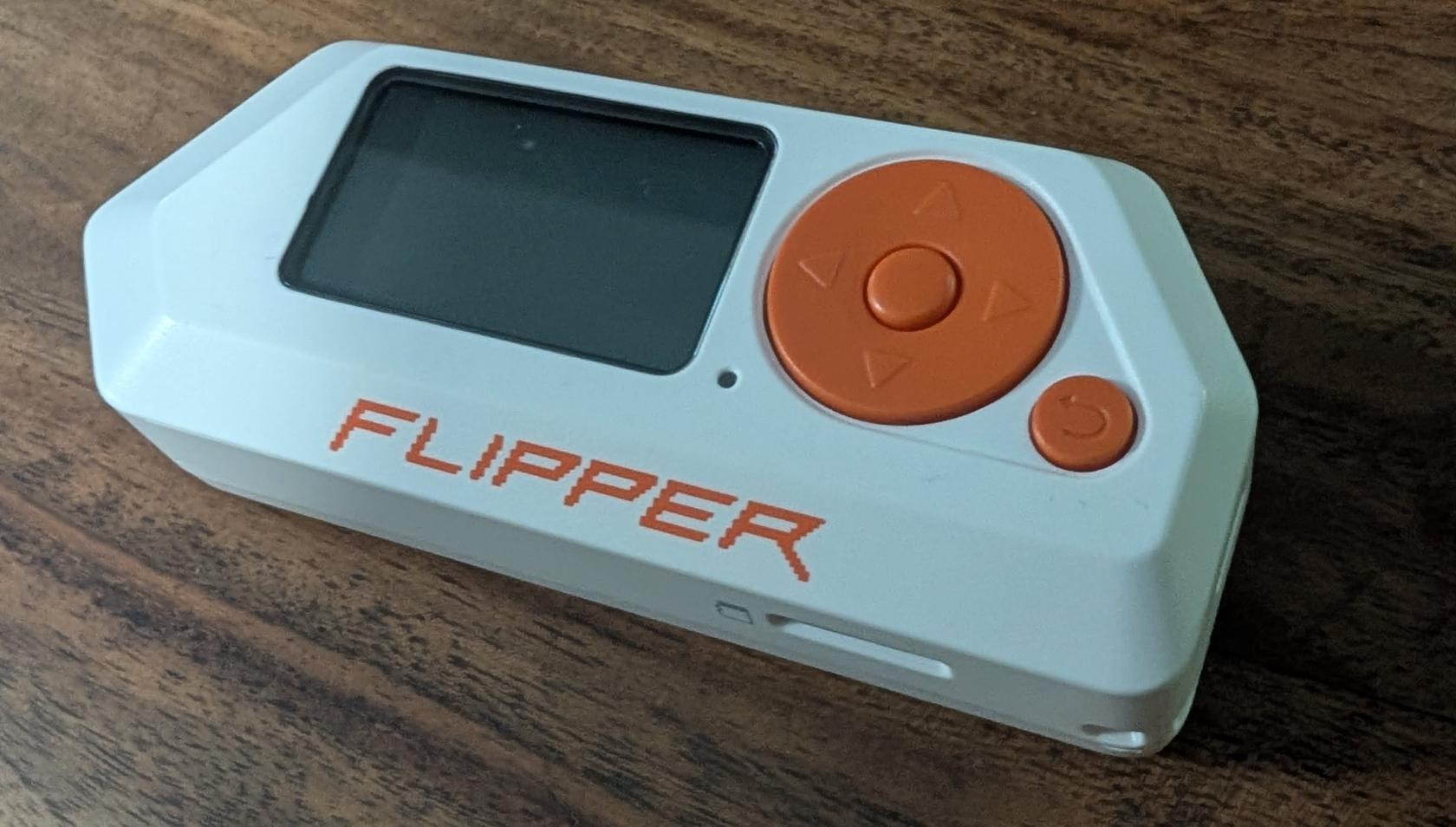](https://wiki.drheck.dev/uploads/images/gallery/2026-08/flipper.jpeg)
Most wireless AC outlet relays use **Amplitude Shift Keying / On-Off Keying (ASK/OOK)** fixed-code ICs (e.g. `Princeton PT2262`, `SC5262`, `EV1527`, or `Holtek`):
1. **Protocol Capture**:
* Open **Sub-GHz → Read** on Flipper Zero.
* Transmit from factory remote: Flipper identifies frequency (433.92 MHz), bit length (e.g. 24-bit / 33-bit), hex payload, and pulse duration (e.g. ~291 µs).
2. **Raw Signal Capture (Fallback)**:
* Open **Sub-GHz → Read RAW** at `433.92 MHz` (Modulation: `AM650`).
* Record demodulated 433.92 MHz ASK/OOK pulses into raw `.sub` files.
3. **Validation via Replay**:
* Replaying `.sub` files directly from Flipper Zero reliably triggered physical relays, confirming that recorded pulse sequences were valid.
4. **Pulse-Interval Extraction**:
* High pulse ≈ 874 µs, Low pulse ≈ 291 µs for bit `'1'`
* High pulse ≈ 291 µs, Low pulse ≈ 874 µs for bit `'0'`
* Trailing sync gap ≈ 291 µs High, 10,190 µs Low (~10.2 ms)
* Fundamental clock tick: **Te = 291.27 µs** (3433.22 baud)
5. **Isolating the Transceiver Issue**: Because Flipper Zero replay worked consistently while initial YARD Stick One transmissions failed, we confirmed the payload bitstreams were correct, isolating the root cause to the CC1111 reference crystal configuration.
### Crystal Oscillator Frequency (24.0 MHz vs 26.0 MHz)
The most elusive obstacle was the RF carrier frequency register calculation:
* **The Assumption**: Standard Texas Instruments CC1101 transceiver chips commonly use a **26.0 MHz** reference crystal. Using the standard TI datasheet formula with a 26 MHz clock calculated the frequency control word as `FREQ = 0x10B071` for 433.92 MHz:
* `FREQ = (433,920,000 / 26,000,000) × 2^16 = 1,093,745 = 0x10B071`
* **The Reality**: The **CC1111 USB SoC** on the YARD Stick One does *not* use a 26 MHz crystal. Because USB 2.0 Full-Speed requires a 48 MHz clock derived from a 2x PLL, the CC1111 utilizes a **24.0 MHz reference crystal** (`f_XOSC = 24.0 MHz`).
* **The Consequence**: When `0x10B071` was loaded into a 24 MHz CC1111, the actual emitted RF carrier was:
* `Actual Frequency = (1,093,745 × 24,000,000) / 2^16 = 400.54 MHz`
The transceiver was broadcasting over **33 MHz off-target**, resulting in zero signal reaching the 433.92 MHz receivers.
* **The Fix**: Calibrating for the true 24.0 MHz crystal yielded the exact frequency registers:
* `FREQ = (433,920,000 / 24,000,000) × 2^16 = 1,184,883 = 0x121473`
* `FREQ2 = 0x12`, `FREQ1 = 0x14`, `FREQ0 = 0x73` (with Channel `CHANNR = 0x00`).
### Pulse Framing & Sync Gap Correction
From Flipper Zero capture analysis:
* **Bit `0`**: 1 tick High, 3 ticks Low (`1000` -> 291 µs High, 874 µs Low)
* **Bit `1`**: 3 ticks High, 1 tick Low (`1110` -> 874 µs High, 291 µs Low)
* **Sync Gap**: 1 tick High, 35 ticks Low (`1` + 35 zeros -> 291 µs High, 10.19 ms Low)
**The Framing Bug**: Initial synthetic generators placed a sync pulse at the *beginning* of the frame and another sync pulse at the *end*. When repeating frames in a burst, this created two back-to-back sync gaps (>21 ms of dead carrier), which caused the relay microcontroller's state machine to timeout and drop the frame.
**The Fix**: A frame consists strictly of the **33 data bits followed by a single trailing sync gap**:
* **Frame Composition** = (33 × 4) + 36 = 168 ticks = **21 bytes** (48.93 ms)
### Multi-Frame Contiguous Streaming vs Single-Shot Bursts
Consumer 433 MHz ASK/OOK receivers use simple superheterodyne/regenerative circuits with slow Automatic Gain Control (AGC). Single-shot transmissions or frames separated by USB packet latency fail because the receiver AGC cannot settle in time.
**The Fix**: In the `studio-power` script, the 21-byte frame is multiplied into a **continuous 630-byte stream** (30 consecutive frames) transmitted in a single uninterrupted RF burst:
* **Burst Duration** = (630 bytes × 8 bits) / 3433.22 baud = **1.468 seconds**
This ensures the receiver AGC locks on and decodes the command reliably.
---
## 5. Protocol Specification (Princeton / Fosmon 33-Bit PWM)
### Timing & Waveform Structure
* **Fundamental Clock Tick Period (Te)**: 291.27 µs (3433.22 baud)
* **Bit Symbol `0`**: 1 tick High (291 µs), 3 ticks Low (874 µs) -> `1000`
* **Bit Symbol `1`**: 3 ticks High (874 µs), 1 tick Low (291 µs) -> `1110`
* **Trailing Sync Pulse**: 1 tick High (291 µs), 35 ticks Low (10.19 ms) -> `1` + 35 zeros
```text
Bit '0': +---+
| |___________________ (1 tick high, 3 ticks low)
<------ 3Te ------->
Bit '1': +---------------+
| |_______ (3 ticks high, 1 tick low)
<----- 3Te ----><--Te-->
Sync: +---+
| |____________________________________________________ (1 tick high, 35 ticks low)
<---------------------- 35Te ----------------------->
```
---
## 6. CC1111 Hardware Register Map & RfCat USB Protocol
The standalone native C driver (`yard_tx.c` / `cc1111_rfcat.h`) controls the transceiver directly using `libusb-1.0` control transfers and bulk endpoints:
### RfCat USB Vendor Requests (`bmRequestType = 0x40`)
* `0x00` (`RFCAT_REQ_PING`): Verifies firmware communication.
* `0x01` (`RFCAT_REQ_STROBE`): Dispatches CC1111 radio command strobes (`0x01` = `STX`, `0x04` = `SIDLE`).
* `0x03` (`RFCAT_REQ_PEEK`): Reads memory-mapped SFR / XDATA registers.
* `0x04` (`RFCAT_REQ_POKE`): Writes memory-mapped SFR / XDATA registers.
* `0x10` (`RFCAT_REQ_SET_AMP_MODE`): Toggles Skyworks SE2431L Power Amplifier (`1` = ON, `0` = Bypass).
* `EP 0x04` (`RFCAT_EP_BULK_OUT`): High-speed USB Bulk OUT endpoint for streaming OOK baseband byte frames directly to the CC1111 TX FIFO.
### Calibrated CC1111 Transceiver Register Map
| Register Name | XDATA Address | Config Value | Register Function & Mathematical Derivation |
| :--- | :--- | :--- | :--- |
| `FREQ2` | `0xDF09` | `0x12` | Frequency Synthesizer MSB: `FREQ = (433,920,000 / 24,000,000) × 2^16 = 0x121473` |
| `FREQ1` | `0xDF0A` | `0x14` | Frequency Synthesizer Middle Byte |
| `FREQ0` | `0xDF0B` | `0x73` | Frequency Synthesizer LSB |
| `CHANNR` | `0xDF0C` | `0x00` | Base RF channel index (0) |
| `MDMCFG4` | `0xDF10` | `0x08` | Filter bandwidth (187.5 kHz) & Data Rate Exponent (`DRATE-E = 8`) |
| `MDMCFG3` | `0xDF11` | `0x84` | Data Rate Mantissa (`DRATE-M = 132`): `Baud = ((256 + 132) × 2^8 / 2^28) × 24 MHz = 3433.22 baud` |
| `MDMCFG2` | `0xDF12` | `0x30` | Modulation format: ASK/OOK (`0x30`), preamble/sync word disabled |
| `MDMCFG1` | `0xDF13` | `0x00` | Zero extra preamble bytes |
| `MDMCFG0` | `0xDF14` | `0xF8` | Channel spacing exponent |
| `FREND0` | `0xDF17` | `0x01` | Sets PA output power level index 1 for bit symbol 1 |
| `MCSM0` | `0xDF18` | `0x18` | Automatic synthesizer calibration on IDLE-to-TX transition |
| `PA_TABLE1`| `0xDF2F` | `0xC0` | Maximum RF output power (+10 dBm base, +20 dBm via SE2431L amplifier) |
| `PA_TABLE0`| `0xDF2E` | `0x00` | Carrier cut-off for OOK Low level |
| `PKTCTRL0`| `0xDF08` | `0x00` | Fixed packet length mode |
| `RFST` | `0xDF36` | `0x01` | Radio Command Strobe: `STX` (Start Transmission) |
---
## 7. Studio Device Payload Database
Every studio outlet has a dedicated 33-bit code for **ON** and **OFF**:
| Device Key | Device Name | 33-Bit Binary Bitstream (ON / OFF) | Hex Payload (ON / OFF) |
| :--- | :--- | :--- | :--- |
| `mrc` | **Moroccan Lamp** | `110100001100000100001011011110100` (ON)
`110100001100000100001010011110110` (OFF) | `0x1a18216f4`
`0x1a18214f6` |
| `rack` | **Recording Rack** | `001011011010100100001011100110000` (ON)
`001011011010100100001010100110010` (OFF) | `0x5b521730`
`0x5b521532` |
| `computer` | **Studio Computer** | `001011011010100100001101100111110` (ON)
`001011011010100100001100100111100` (OFF) | `0x5b521b3e`
`0x5b52193c` |
| `sub` | **Subwoofer** | `010110100111010000001101000111000` (ON)
`010110100111010000001100000111010` (OFF) | `0xb4e81a38`
`0xb4e8183a` |
| `pa` | **Main PA Speakers** | `010110100111010000001011000110100` (ON)
`010110100111010000001010000110110` (OFF) | `0xb4e81634`
`0xb4e81436` |
| `tv` | **TV Monitor** | `010110100111010000001111000111100` (ON)
`010110100111010000001110000111110` (OFF) | `0xb4e81e3c`
`0xb4e81c3e` |
| `neewer` | **Neewer LED Panels** | `001010010110011000001111010101110` (ON)
`001010010110011000001110010101100` (OFF) | `0x52cc1eae`
`0x52cc1cac` |
---
## 8. Authentik & Mobile 1-Tap Trigger
To control the studio securely from any phone or device on the LAN/WAN:
1. **Reverse Proxy & Forward Auth**:
* Nginx on `ul` forwards `https://studio.drheck.dev/api/power` through Authentik forward-auth.
2. **PiKVM Local Webhook**:
* When authorized, the proxy issues an API call to a lightweight Python webhook running on `pikvm-studio`.
3. **Mobile Launcher Shortcuts**:
* **iOS**: In the **Shortcuts** app, create an action: *Get contents of URL* `POST https://studio.drheck.dev/api/power/on`.
* **Android**: Configure a launcher widget using the **HTTP Shortcuts** app.
* **Siri / Voice**: Trigger via *"Hey Siri, turn on recording studio"*.
---
## 9. Signal Synthesis Implementation (Python)
To generate and transmit any command from scratch using `rflib`:
```python
#!/usr/bin/env python3
import sys, time
import rflib
def encode_pwm_exact(bit_string):
"""Converts a 33-bit code into an exact 21-byte OOK frame at 3433 baud."""
raw = ""
for bit in bit_string:
if bit == '1':
raw += "1110" # 3 ticks high, 1 tick low
elif bit == '0':
raw += "1000" # 1 tick high, 3 ticks low
# Append trailing sync pulse: 1 tick high, 35 ticks low (~10.2 ms)
raw += "1" + ("0" * 35)
while len(raw) % 8 != 0:
raw += "0"
return bytes(int(raw[i:i+8], 2) for i in range(0, len(raw), 8))
def send_power_signal(bit_string, repeats=30):
payload = encode_pwm_exact(bit_string)
d = rflib.RfCat()
d.setFreq(433920000)
d.setMdmModulation(rflib.MOD_ASK_OOK)
d.setMdmDRate(3433)
d.setMdmSyncMode(0)
d.setMaxPower()
d.setAmpMode(1) # Enable hardware RF power amplifier
d.RFxmit(payload * repeats)
d.cleanup()
# Example: Turn ON Moroccan Lamp
send_power_signal("110100001100000100001011011110100", repeats=30)
```
---
## 10. CLI Tool: `studio-power`
The utility is permanently installed on `pikvm-studio` at `/usr/local/bin/studio-power`.
### Command Syntax
```shell
# Toggle individual devices:
$ sudo studio-power mrc on
$ sudo studio-power mrc off
$ sudo studio-power rack on
$ sudo studio-power rack off
$ sudo studio-power computer on
$ sudo studio-power computer off
$ sudo studio-power sub on
$ sudo studio-power sub off
$ sudo studio-power pa on
$ sudo studio-power pa off
$ sudo studio-power tv on
$ sudo studio-power tv off
$ sudo studio-power neewer on
$ sudo studio-power neewer off
# Session management (turn entire studio on or off):
$ sudo studio-power all on
$ sudo studio-power all off
# List devices:
$ studio-power list
```
---
## 11. External References & FCC Certification Links
* **Git Repository**: [https://git.drheck.dev/luke/studio_yardstick](https://git.drheck.dev/luke/studio_yardstick)
* **Fosmon Hardware & FCC Filings**:
* [Fosmon Wireless Remote Control Transmitter (FCC ID: 2A3BM5782988)](https://fccid.io/2A3BM5782988)
* [Fosmon Inc. FCC Grantee Directory (Grantee Code: 2A3BM)](https://fccid.io/company/Fosmon-Inc)
* [FCC Equipment Authorization System (EAS) Search](https://apps.fcc.gov/oetcf/eas/reports/GenericSearch.cfm)
* **Transceiver Hardware & Firmware**:
* [Great Scott Gadgets YARD Stick One Product Portal](https://greatscottgadgets.com/yardstickone/)
* [YARD Stick One Hardware Schematics & Design Files (GitHub)](https://github.com/greatscottgadgets/yardstickone)
* [Texas Instruments CC1111F32 Sub-1 GHz SoC Datasheet](https://www.ti.com/product/CC1111F32)
# Studio Control Host & Remote Access
This page details the management nodes, network topology, SSH agent authentication chain, and operating system configurations for remote studio management.
---
## 1. Remote Access & SSH Socket Topology
All studio infrastructure is accessible securely through the main server, `ul`, via forwarded SSH authentication sockets:
```
+---------------------------------------------------------------------------------+
| Host: ul (ul.drheck.dev) |
| - Infrastructure Gateway |
| - Agent Socket Dir: ~/.ssh/agent/ |
+---------------------------------------------------------------------------------+
| |
| SSH | SSH
v v
+---------------------------------------+ +-----------------------------------+
| Host: pikvm-studio | | Host: bmo95 |
| - IP: Static / DHCP Reservation | | - 48-Channel FireWire DAW Host |
| - PiKVM V4 Plus Management | | - Linux 6.13 PREEMPT_RT Kernel |
| - Sub-GHz RF Studio Power Automation | | - JACK & ALSA Real-time Audio |
+---------------------------------------+ +-----------------------------------+
```
---
## 2. `pikvm-studio` Specifications & Filesystem Model
* **Hardware**: PiKVM V4 Plus (Raspberry Pi 4 Model B, 2GB RAM)
* **Operating System**: Arch Linux ARM (`aarch64`, Linux 6.12.100-1-rpi)
* **Attached Peripherals**:
* PiKVM V4 Plus capture & ATX power control board
* Great Scott Gadgets YARD Stick One (`1d50:605b`, USB Bus 001)
[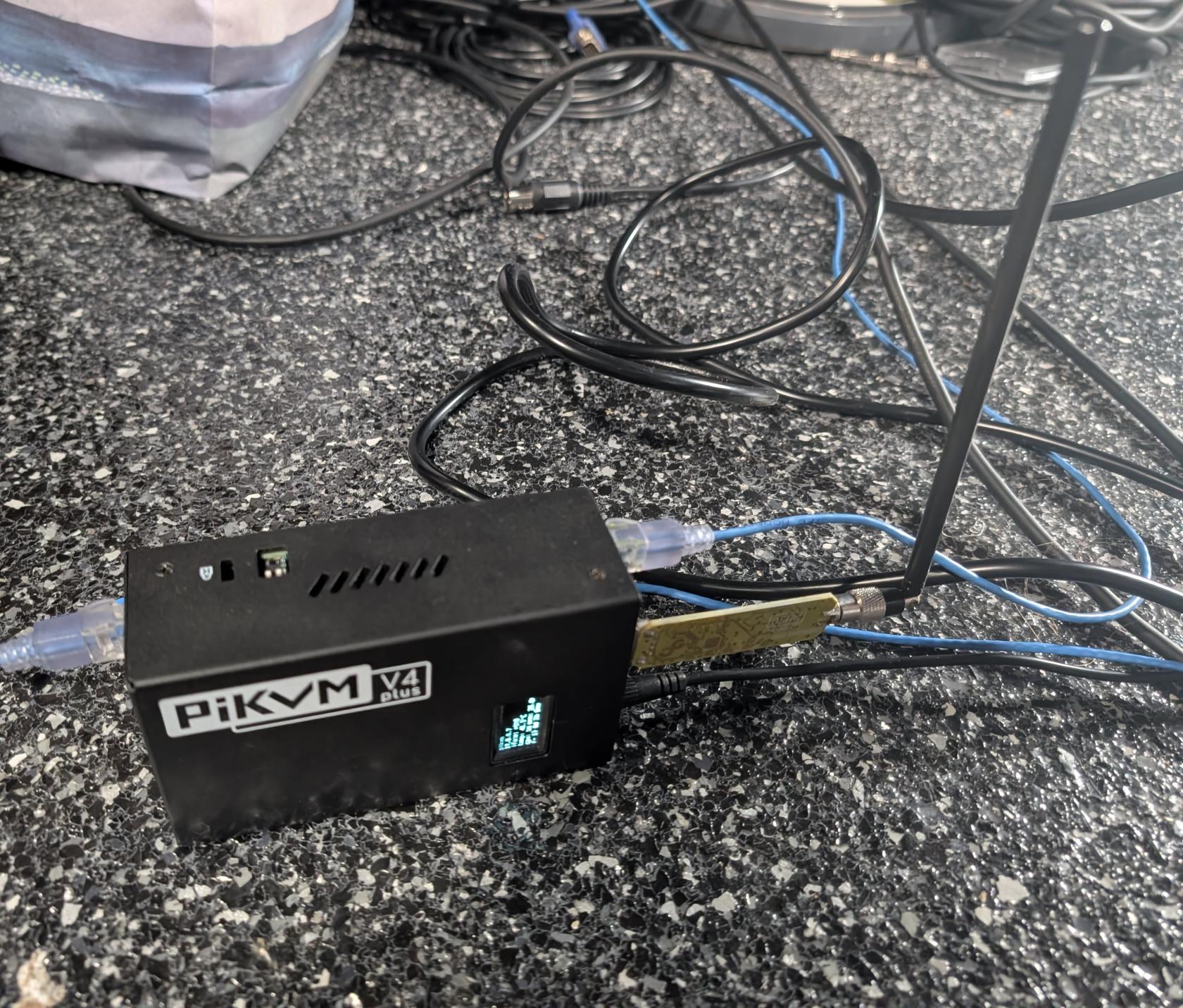](https://wiki.drheck.dev/uploads/images/gallery/2026-08/pikvm.jpeg)
### Read-Only Root Filesystem (`ro` / `rw`)
To prevent SD card corruption during sudden power losses, `pikvm-studio` boots with a **read-only root filesystem** (`/` mounted `ro`).
#### Modification Workflow
When installing new utilities, Python libraries, or modifying configuration:
```shell
# 1. Remount root partition as read-write
$ sudo rw
# 2. Make file modifications or package updates
$ sudo cp /tmp/studio-power /usr/local/bin/studio-power
$ sudo chmod +x /usr/local/bin/studio-power
# 3. Remount root partition back to read-only
$ sudo ro
```
Temporary work, logs, and transient scripts can also be written to `/tmp` (tmpfs) without switching to `rw` mode.
---
## 3. `bmo95` Audio Host Specifications
* **Architecture**: `x86_64`
* **Kernel**: Linux 6.13.0-rt-preempt
* **Configuration Repository**: [link](https://git.drheck.dev/luke/audio_config)
# Touch phone -> Studio turns on and starts recording
## AKA: One-Click Mobile Studio Automation
This page outlines the end-to-end architecture, API integration layers, OSC/Lua communication protocols, and execution plan for triggering studio power, booting the DAW host, instantiating timestamped Ardour sessions from templates, arming target tracks, and rolling transport from a single mobile button.
---
## 1. End-to-End Workflow & Pipeline Architecture
The objective is a zero-touch "Quick Record" pipeline: pressing a single button on a mobile phone (iOS Shortcut, Android Widget, Telegram Bot, or PWA) triggers an automated multi-stage turn-up sequence across the studio network.
```
+---------------------------------------------------------------------------------------------------+
| Mobile Phone (iOS / Android / PWA) |
| [ 🔴 ONE-TOUCH QUICK RECORD ] |
+---------------------------------------------------------------------------------------------------+
| POST https://studio.drheck.dev/api/quick-record
v
+---------------------------------------------------------------------------------------------------+
| Host: ul (Gateway Orchestrator & Fastify/Python API Service) |
| 1. Dispatches RF power turn-on command to pikvm-studio |
| 2. Triggers ATX power / Wake-on-LAN for DAW host (bmo95) |
| 3. Polls bmo95 SSH & RT audio stack until ready |
| 4. Dispatches Ardour project instantiation & OSC track arming commands |
| 5. Pushes confirmation webhook / notification to phone |
+-----------------------------------|---------------------------------------|-----------------------+
| |
SSH Command | | SSH / OSC (Port 3819)
v v
+-----------------------------------------------+ +-----------------------------------------------+
| Host: pikvm-studio (Sub-GHz Transceiver) | | Host: bmo95 (DAW Host) |
| - Runs: sudo studio-power all on | | - Boots PREEMPT_RT kernel |
| - Engages YARD Stick One at 433.92 MHz | | - Auto-starts JACK + zita bridges |
| - Powers: Rack, Monitors, Moroccan Lamp, LEDs | | - Launches Ardour with Session Template |
| - Pulses ATX power header via GPIO / Relay | | - Arms selected tracks via OSC UDP 3819 |
+-----------------------------------------------+ | - Rolls global recording transport |
+-----------------------------------------------+
```
---
## 2. Technical Integration Layers
### Layer A: Studio Power & DAW Wakeup (`pikvm-studio`)
1. **RF Outlet Switching**:
* API calls `pikvm-studio`: `sudo /usr/local/bin/studio-power all on` (switches the Moroccan Lamp, Recording Rack Gear, the Subwoofer, PA Monitors, the TV, and Neewer LEDs).
2. **DAW Host ATX Wake**:
* `pikvm-studio` triggers the ATX power button on `bmo95` via PiKVM ATX header.
---
### Layer B: Audio Stack & Real-Time Engine Initialization (`bmo95`)
When `bmo95` boots, its systemd user units initialize audio backend:
```shell
# Auto-launched on bmo95 user session login:
$ systemctl --user start jack.service
$ systemctl --user start zita-a2j-blue.service zita-j2a-blue.service
$ systemctl --user start zita-a2j-green.service zita-j2a-green.service
$ systemctl --user start zita-a2j-yellow.service zita-j2a-yellow.service
$ ~/git/audio_config/profiles/jack-alsa/set-port-aliases.sh
```
---
### Layer C: Ardour Headless/GUI Instantiation
Ardour natively supports automated session creation from templates via CLI:
```shell
$ DISPLAY=:0 ardour9 \
--no-splash \
--no-announcements \
--template "48ch_Studio_Master" \
--new "/data/sessions/Session_$(date +%Y-%m-%d_%H%M%S)"
```
* **`--template `**: Clones track structures, input/output bus routing, plugin chains, and monitor matrices from a predefined master studio template.
* **`--new `**: Automatically creates and locks a timestamped project folder without interactive GUI dialogs.
* **`--no-splash` & `--no-announcements`**: Suppresses startup modal windows that block automation.
---
### Layer D: Ardour Remote API Control (OSC & Lua)
Ardour provides two remote control APIs:
#### 1. Open Sound Control (OSC) — UDP Port 3819
Ardour includes a comprehensive built-in OSC server that can be queried and triggered over UDP.
| OSC Address | Arguments | Action |
| :--- | :--- | :--- |
| `/strip/recenable` | `i: strip_num`, `i: state (1/0)` | Arms or disarms a specific audio track |
| `/track/recenable` | `s: track_name`, `i: state (1/0)` | Arms or disarms track by name (e.g. `Red_01`) |
| `/rec_enable_toggle` | *(none)* | Toggles global master record arm status |
| `/transport_record` | `i: 1` | Sets global transport record arm to ON |
| `/transport_play` | `i: 1` | Rolls transport (starts playback/recording) |
| `/transport_stop` | `i: 1` | Stops transport |
| `/save_state` | *(none)* | Flushes and saves session XML to disk |
| `/access_action` | `s: "Action/Name"` | Executes any internal Ardour GUI menu action |
#### 2. Native Lua Scripting (`ardour-exec` / OSC `/eval`)
Ardour includes an embedded Lua execution engine. Complex automation scripts (e.g., auto-detecting connected microphones, verifying input levels, and arming only active channels) can be evaluated dynamically:
```lua
-- Lua script to arm all capture tracks matching prefix
for r in Session:get_routes():iter() do
local track = r:to_track()
if not track:is_null() and track:name():match("^Red_") then
track:rec_enable_control():set_value(1, PBD.GroupControlDisposition.NoGroup)
end
end
Session:maybe_enable_record()
Session:request_transport_speed(1.0, true, ARDOUR.TransportRequestSource.TRS_UI)
```
---
## 3. Implementation Plan & Execution Phases
The automation will be rolled out across 4 distinct phases:
### Phase 1: Ardour Template & OSC Server Configuration (`bmo95`)
* [ ] Create master 48-channel template (`48ch_Studio_Master`) with calibrated input routing (`Red_01..12`, `Blue_01..12`, `Green_01..12`, `Yellow_01..12`).
* [ ] Enable and persist Ardour OSC server on UDP port 3819 (`Preferences -> Control Surfaces -> Open Sound Control`).
* [ ] Build a Python helper script `/usr/local/bin/ardour-control` on `bmo95` using `python-osc` to test track arming, session saving, and transport control via CLI.
### Phase 2: Host Wakeup & Readiness Polling (`ul` & `pikvm-studio`)
* [ ] Configure Wake-on-LAN and PiKVM ATX power button trigger for `bmo95`.
* [ ] Write an orchestration wrapper script `/home/luke/bin/studio-quick-record` on `ul` that:
1. Sends RF power command `sudo studio-power all on` to `pikvm-studio`.
2. Sends ATX boot command to `bmo95`.
3. Polls `ssh -q bmo95` until the PREEMPT_RT kernel is responsive (timeout: 45s).
4. Confirms `jack.service` and all 3 `zita-a2j-*` duplex bridges are active.
### Phase 3: Automated Session Launch & Transport Trigger
* [ ] Extend `/home/luke/bin/studio-quick-record` to invoke Ardour session creation via SSH.
* [ ] Send OSC burst to arm user-selected tracks (e.g. Drums, Vocals, Master Stereo Bus).
* [ ] Roll recording transport and log initial take time.
### Phase 4: Mobile Webhook & UI Control Endpoint
* [ ] Deploy a lightweight authenticated REST service on `ul` (Fastify / Python Flask on dedicated ULA IP).
* [ ] Expose two endpoints behind Authentik OIDC single sign-on / API token:
* `POST /api/studio/record/start`: Powers studio, boots host, opens session, arms tracks, rolls recording.
* `POST /api/studio/record/stop`: Stops transport, saves session, optionally powers down.
* [ ] Configure iOS Shortcuts / Android Widget / Telegram Bot webhook for single-tap activation from any smartphone.
---
## 4. Python Ardour Remote Controller Reference
```python
#!/usr/bin/env python3
"""Ardour Remote Control Client via OSC (UDP 3819)"""
import sys, time
from pythonosc import udp_client
ARDOUR_IP = "127.0.0.1"
ARDOUR_PORT = 3819
def get_client(ip=ARDOUR_IP, port=ARDOUR_PORT):
return udp_client.SimpleUDPClient(ip, port)
def start_recording(client, tracks_to_arm=[1, 2, 3, 4]):
print("-> Arming tracks:", tracks_to_arm)
for track_num in tracks_to_arm:
client.send_message("/strip/recenable", [track_num, 1])
time.sleep(0.05)
print("-> Enabling global record arm...")
client.send_message("/transport_record", 1)
time.sleep(0.1)
print("-> Rolling transport...")
client.send_message("/transport_play", 1)
print("-> Recording active.")
def stop_and_save(client):
print("-> Stopping transport...")
client.send_message("/transport_stop", 1)
time.sleep(0.2)
print("-> Saving session...")
client.send_message("/save_state", [])
print("-> Session saved successfully.")
if __name__ == "__main__":
if len(sys.argv) < 2:
print("Usage: ardour-control ")
sys.exit(1)
c = get_client()
cmd = sys.argv[1].lower()
if cmd == "start":
start_recording(c)
elif cmd == "stop":
stop_and_save(c)
elif cmd == "save":
c.send_message("/save_state", [])
```
# Pikvm-studio Setup Detail
Documentation and system management guide for the dedicated studio KVM-over-IP appliance (**`pikvm-studio`**).
* **Repository:** [link](https://git.drheck.dev/luke/pikvm_studio)
* **Hardware Model:** PiKVM V4 Plus (Raspberry Pi Compute Module 4 Rev 1.1)
* **Target Workstation:** `bmo95` (Linux Audio / DAW Workstation)
---
## 1. Video Architecture: 1080p @ 60.000 Hz Pass-Through
PiKVM V4 Plus features a built-in HDMI hardware pass-through port (`OUT2`) and a TC358743 HDMI-to-CSI capture bridge. By default, PiKVM V4 advertises a 1920x1200 EDID. When connected to a standard 1080p physical display, the image would be cropped from the bottom.
### Applied Video Optimizations
1. **1080p EDID Preset (No 1920x1200 Mode):**
* Imported and applied the `v4plus.no-1920x1200` EDID preset to `/etc/kvmd/tc358743-edid.hex` via `kvmd-edidconf`.
* Ensures the target host (`bmo95`) negotiates uncropped 1920x1080 @ 60.000 Hz for both remote web streaming and the physical monitor on `OUT2`.
2. **GPU Clock & H.264 60 FPS Boost:**
* Added `gpu_freq=700` to `/boot/config.txt` to provide sufficient GPU clock headroom for full 60fps hardware H.264 encoding.
* Configured KVMD streamer overrides in `/etc/kvmd/override.yaml`:
```yaml
kvmd:
streamer:
h264_boost: true
desired_fps:
default: 60
```
### Physical Wiring
* **HDMI Input (Rear Bottom Right):** Connected to `bmo95` AMD Radeon GPU HDMI output.
* **HDMI Output 2 (`OUT2`):** Connected to the local physical studio monitor (pass-through).
* **USB-C OTG (Rear):** Connected to `bmo95` USB port for keyboard/mouse HID emulation and mass storage drive.
* **RJ45 Ethernet (Front):** Connected to local studio LAN.
---
## 2. Configuration Management: Chezmoi
Configuration files across `/etc` (ext4) and `/boot` (FAT32) are tracked in Git using **[Chezmoi](https://www.chezmoi.io/)**.
### Why Chezmoi on PiKVM?
1. **FAT32 `/boot` Compatibility:** The Raspberry Pi bootloader partition (`/boot`) uses a VFAT filesystem which does not support Linux symlinks. Chezmoi uses a **Source $\rightarrow$ Target Copy Model**, rendering physical files without symlink errors.
2. **Security & Ownership Compliance:** Security-sensitive utilities (such as `sudo` and PAM) require configuration files to be owned by `root:root` with strict permissions (e.g. `0440`). Chezmoi preserves exact permissions and system UIDs rather than pointing symlinks to user-owned directories.
3. **Drift Detection:** `chezmoi diff` provides instant comparison between Git state and the live appliance filesystem.
### Chezmoi Configuration
Located in `/home/luke/.config/chezmoi/chezmoi.yaml`:
```yaml
destDir: "/"
sourceDir: "/home/luke/git/pikvm_studio"
```
### Git History Structure
The repository at [https://git.drheck.dev/luke/pikvm_studio](https://git.drheck.dev/luke/pikvm_studio) maintains a 2-stage commit baseline:
1. `feat(pikvm): baseline vanilla system configuration` — Stock OS overrides, default 1920x1200 EDID, and stock `/boot/config.txt`.
2. `feat(video): configure 1080p60 pass-through, H.264 boost, and GPU frequency` — All active studio customizations.
Running `git diff HEAD~1` clearly documents all modifications relative to factory OS defaults.
---
## 3. PiKVM Read-Only Lifecycle & Chezmoi Workflow
PiKVM OS operates with read-only root (`/`) and boot (`/boot`) partitions to protect flash storage from corruption. When managing configurations with Chezmoi, follow these standard workflows:
### A. Checking for Configuration Drift
To compare the Git repository against the live system:
```bash
chezmoi diff
```
### B. Editing and Applying Changes
To edit a tracked file and deploy it to the live system:
```bash
# 1. Remount filesystem as read-write
sudo rw
# 2. Edit the file in Chezmoi
chezmoi edit /etc/kvmd/override.yaml
# 3. Preview changes
chezmoi diff
# 4. Apply changes to disk
sudo chezmoi apply
# 5. Commit and push to Forgejo
cd ~/git/pikvm_studio
git add .
git commit -S -m "feat: description of change"
gpush pikvm_studio
# 6. Return filesystem to read-only
sudo ro
```
### C. Ingesting Modifications Made Directly on Disk
If a file was modified outside Chezmoi (e.g. via `kvmd-override` or `kvmd-edidconf`):
```bash
sudo rw
chezmoi re-add /etc/kvmd/override.yaml
chezmoi re-add /etc/kvmd/tc358743-edid.hex
cd ~/git/pikvm_studio
git add .
git commit -S -m "feat: update kvmd settings"
gpush pikvm_studio
sudo ro
```
---
## 4. SSH & GPG Key Management
1. **Terminal Pinentry:** `~/.gnupg/gpg-agent.conf` is configured with `pinentry-program /usr/bin/pinentry-curses` to ensure GPG password prompts display cleanly over headless SSH sessions.
2. **Password Store:** Forgejo API tokens (`forgejo/token/*`) are managed via `pass` and pushed using `~/bin/gpush pass`.
# Rack
TODO: Rack info
[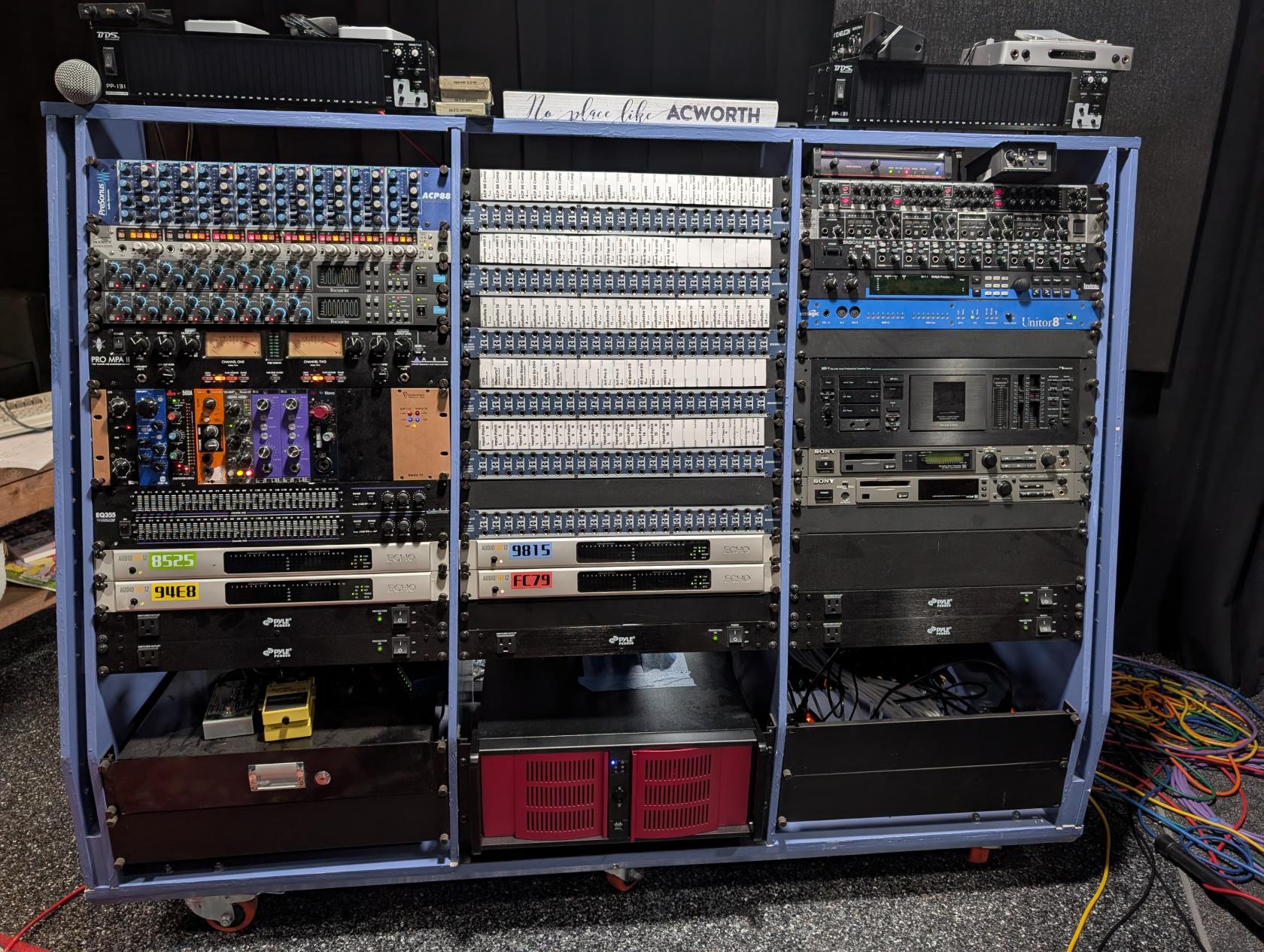](https://wiki.drheck.dev/uploads/images/gallery/2026-08/rack.jpg)